> For the complete documentation index, see [llms.txt](https://docs.payments.thalescloud.io/llms.txt). Markdown versions of documentation pages are available by appending `.md` to page URLs; this page is available as [Markdown](https://docs.payments.thalescloud.io/tokenization/ja/implement-tokenization/mobairusdknotkun/dejitarukdowosuru.md).

# デジタルカードを表示・管理する

このガイドを使用して、 **エンドユーザー** 表示および管理する **デジタルカード** （トークン）としてカード用に作成された **xPay ウォレット** およびその他の **トークンリクエスタ**.

イシュアアプリケーションでは、通常、次のことを行います：

* 特定の対象にリンクされたすべてのデジタルカードを表示する `cardId`
* 各デジタルカードのステータスを表示する（たとえば、アクティブまたは一時停止中）。
* 停止、再開、削除、アクティベートなどの基本的なライフサイクル操作をサポートする

## 前提条件

次のことを確認してください：

* エンドユーザーとカードが登録されている **D1 バックエンド**.
* その **D1 SDK** イシュアアプリケーションに統合され、初期化されている。
* イシュアアプリケーションは D1 SDK のログインフローを完了しています。

## デジタルカードを表示する

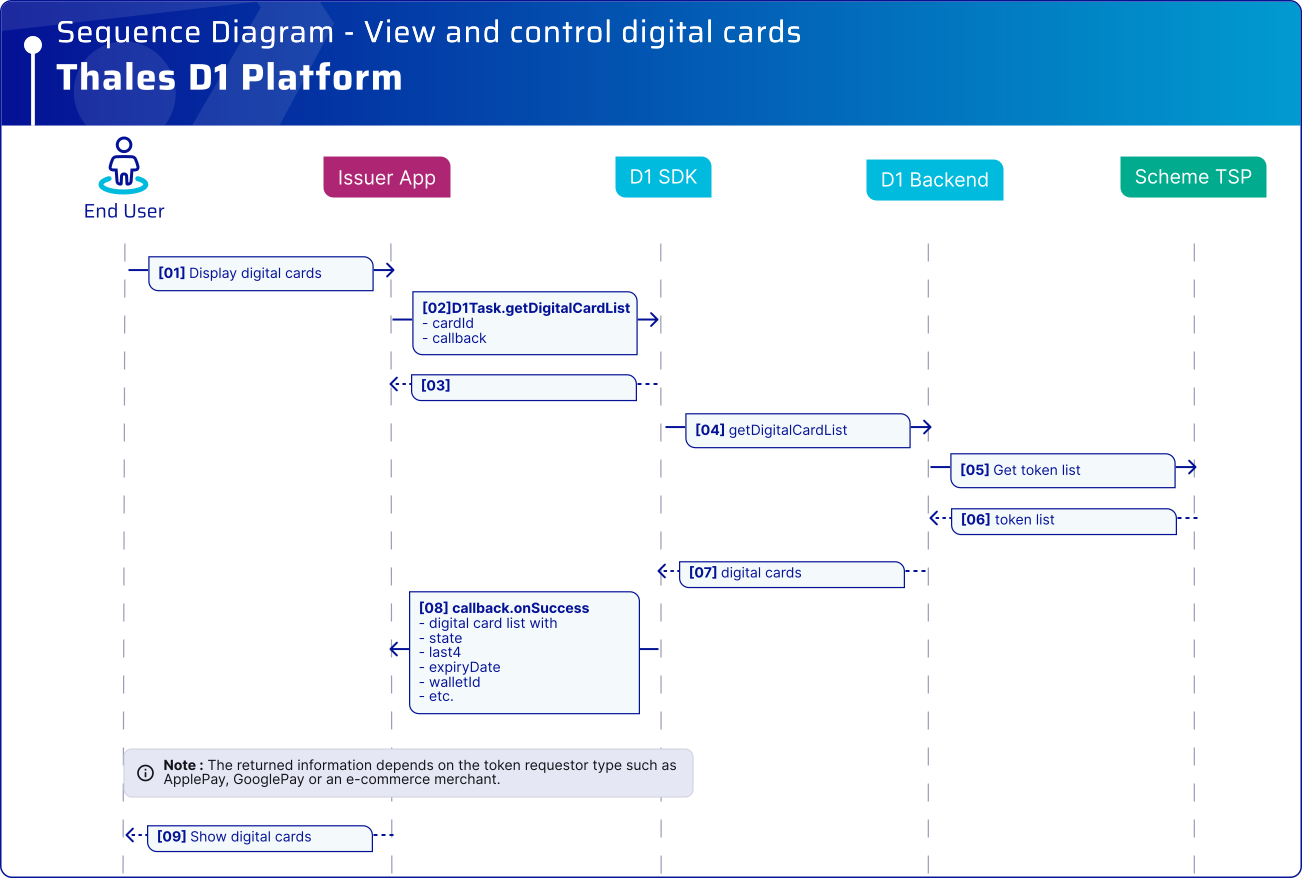
特定の対象に対する既存のデジタルカードを表示するには `cardId`、次を呼び出します `getDigitalCardList()`.

レスポンスには次の一覧が含まれます： `DigitalCard` オブジェクト。Visa Cloud Token Framework (CTF) では、 `DigitalCard` このオブジェクトにはデバイスバインディング情報も含まれ、アプリケーションは各デジタルカードに関連付けられたすべてのデバイスバインディングを表示できます。

その `DigitalCard` 次の情報が含まれます：

* デジタルカードの状態（たとえば、アクティブ、一時停止中、またはアクティベーション待ち）。
* デジタルカードの有効期限。
* デジタルカードの下4桁。
* デジタルカードを含むデバイス名と種類。
* トークンリクエスタID（`tokenRequestorID`).
* デジタルカードが現在のデバイス上にあるかどうか（`isOnCurrentDevice`）は、選択したウォレットまたはトークンリクエスタ（たとえば、Apple Pay、Google Pay、Samsung Pay、または NFC Wallet）に対して示されます。
* デバイスバインディング一覧（Visa CTF の SDK 4.3.0 以降）。各バインド済みデバイスのバインディング参照、デバイス名、バインディング状態（APPROVED、DECLINED、または CHALLENGED）を含みます。

{% hint style="info" %}
決済ネットワークの制限により、トークンリクエスタ名とロゴを常にリアルタイムで取得できるとは限りません。

ベストプラクティスとして、ポートフォリオに関連する上位 5～10 件のトークンリクエスタ ID を特定し、イシュアアプリケーション内にエンドユーザー向けの表示名とロゴをハードコードしてください。
{% endhint %}

### フロー

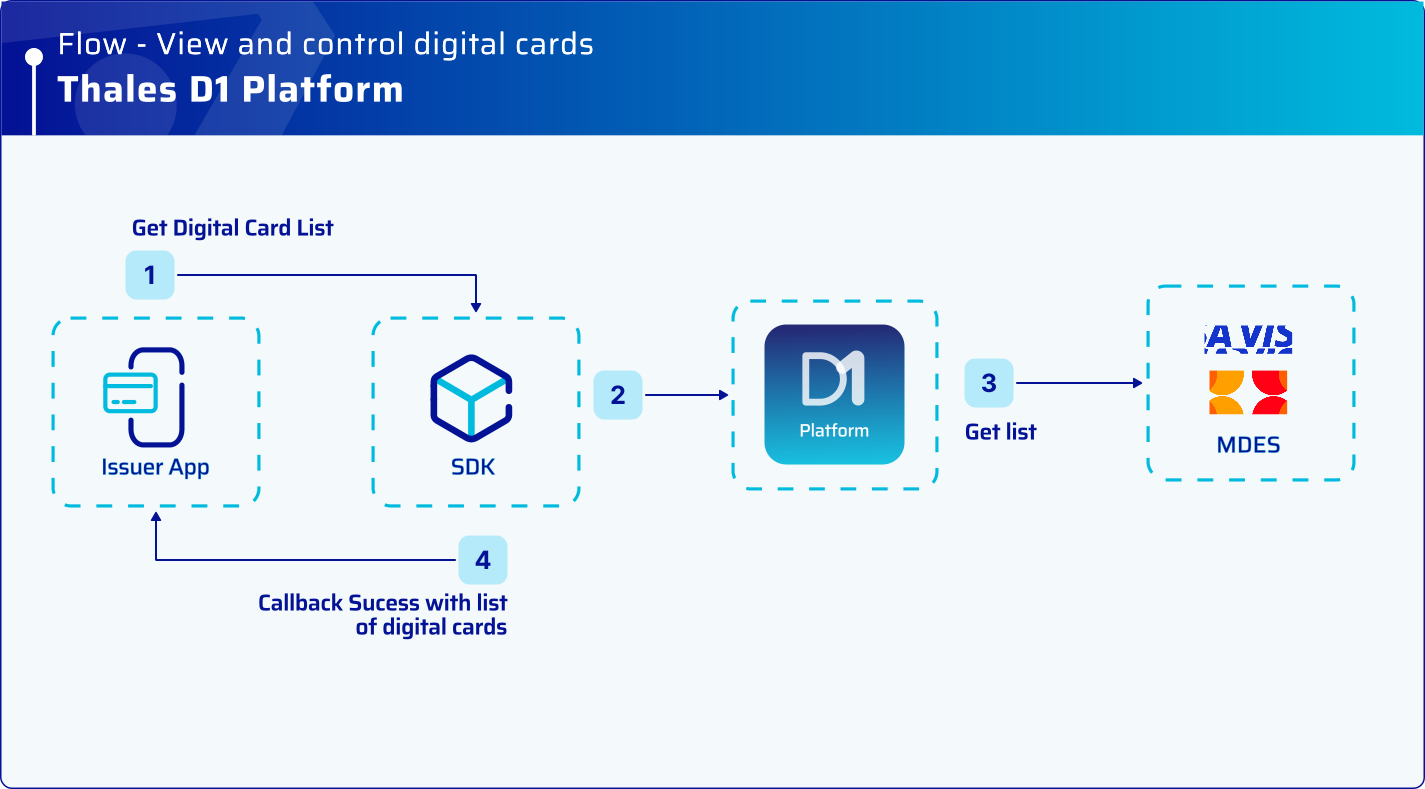
<figure><img src="https://content.gitbook.com/content/W6dljaTEEzefPQILRFB7/blobs/O4LaeusI56juqBAcwnch/Flow%20%20%20View%20and%20control%20digital%20cards.svg" alt="Flow for retrieving the digital card list"><figcaption><p>カードに対するデジタルカード一覧表示の概要フロー。</p></figcaption></figure>

### シーケンス図

**前提条件**

* 消費者アカウントとカードは D1 に登録されています
* SDKは正しく初期化されている
* イシュアアプリが D1 SDK のログイン API を呼び出しました

<figure><img src="https://content.gitbook.com/content/W6dljaTEEzefPQILRFB7/blobs/eEotQiT9eqrKJCr08Zv3/Sequence%20Diagram%20%20%20View%20and%20control%20digital%20cards%20%20%201.svg" alt="Example issuer application screen showing a list of digital cards"><figcaption><p>デジタルカード一覧表示のイシュアアプリケーション UI の例。</p></figcaption></figure>

### 例

{% tabs %}
{% tab title="Android" %}

```kotlin
fun getDigitalCardList(d1Task: D1Task, cardID: String) {
    val callback: D1Task.Callback<List<DigitalCard>> = object : D1Task.Callback<List<DigitalCard>> {

        override fun onSuccess(digitalCardList: List<DigitalCard>) {
            // サーバーから受け取った digitalCardList オブジェクトを処理します。
            // たとえば、上記のサンプル画像のように UI に表示します。
            for (digitalCard in digitalCardList) {
                val digitalCardID = digitalCard.cardID
                val digitalCardState = digitalCard.state // 現在のデジタルカードの状態。
                val digitalCardExp = digitalCard.expiryDate // 現在のデジタルカードの有効期限。
                val last4 = digitalCard.last4 // 現在のデジタルカードの下4桁。
                val tokenRequestorID = digitalCard.tokenRequestorID // トークンリクエスタ ID。
                val isOnCurrentDevice = digitalCard.isOnCurrentDevice // デジタルカードが現在のデバイス上にあるかどうかを識別します。

                // デバイスバインディング一覧を取得します（Visa CTF 向け SDK 4.3.0 以降）。
                val deviceBindingList = digitalCard.deviceBindingList
                deviceBindingList?.forEach { binding ->
                    val bindingReference = binding.bindingReference // バインディング参照 ID。
                    val deviceName = binding.deviceName // デバイス名。
                    val bindingStatus = binding.bindingStatus // APPROVED、DECLINED、または CHALLENGED。
                }
            }
        }

        override fun onError(exception: D1Exception) {
            // D1 SDK Integration – Error Management セクションを参照してください。
        }
    }
    d1Task.getDigitalCardList(cardID, callback)
}
```

{% endtab %}

{% tab title="iOS >= 4.5.0" %}

```swift
let cardID = "" // 例: サーバーから取得
do {
    let service = try d1Task.digitalCardService()
    let digitalCards = try await service.digitalCardList(cardID)
    // 後続のフローを続行します。例: UI を更新
    for digitalCard in digitalCards {
        print("デジタルカード ID: \(digitalCard.cardID)")
        print("状態: \(digitalCard.state.rawValue)")
        print("下4桁: \(digitalCard.last4 ?? "")")
        print("有効期限: \(digitalCard.expiryDate ?? "")")
        print("デバイス ID: \(digitalCard.deviceID ?? "")")
        print("デバイス名: \(digitalCard.deviceName ?? "")")
        print("デバイスタイプ: \(digitalCard.deviceType ?? "")")
        print("トークンリクエスタ ID: \(digitalCard.tokenRequestorID ?? "")")
        print("トークンリクエスタ名: \(digitalCard.tokenRequestorName ?? "")")
        print("現在のデバイス上にあるか: \(digitalCard.isOnCurrentDevice)")
        
        // SDK 4.3.0 以降でデバイスバインディング一覧にアクセスします
        if let deviceBindingList = digitalCard.deviceBindingList {
            for binding in deviceBindingList {
                print("バインディング参照: \(binding.bindingReference ?? "")")
                print("デバイス名: \(binding.deviceName ?? "")")
                print("バインディング状態: \(binding.bindingStatus?.rawValue ?? "")")
            }
        }
    }
} catch let d1Error as D1Error {
    // D1 SDK Integration – Error Management セクションを参照してください
} catch let error {
    // その他のエラーを処理
}
```

{% endtab %}

{% tab title="iOS < 4.5.0" %}

```swift
let cardID = "" // 例えば、サーバーから取得
d1Task.digitalCardList(cardID) { digitalCards, error in
    if let error = error {
        // D1 SDK Integration – Error Management セクションを参照してください。
    } else if let digitalCards = digitalCards {
        // 後続のフローを進めます。たとえば UI を更新します。
        for digitalCard in digitalCards {
            print("デジタルカード ID: \(digitalCard.cardID)")
            print("状態: \(digitalCard.state.rawValue)")
            print("下4桁: \(digitalCard.last4 ?? "")")
            print("有効期限: \(digitalCard.expiryDate ?? "")")
            print("デバイス ID: \(digitalCard.deviceID ?? "")")
            print("デバイス名: \(digitalCard.deviceName ?? "")")
            print("デバイスタイプ: \(digitalCard.deviceType ?? "")")
            print("トークンリクエスタ ID: \(digitalCard.tokenRequestorID ?? "")")
            print("現在のデバイス上にあるか: \(digitalCard.isOnCurrentDevice)")

            // デバイスバインディング一覧を取得します（Visa CTF 向け SDK 4.3.0 以降）。
            if let deviceBindingList = digitalCard.deviceBindingList {
                for binding in deviceBindingList {
                    print("バインディング参照: \(binding.bindingReference ?? "")")
                    print("デバイス名: \(binding.deviceName ?? "")")
                    print("バインディング状態: \(binding.bindingStatus?.rawValue ?? "")")
                }
            }
        }
    }
}
```

{% endtab %}
{% endtabs %}

## デジタルカードを制御する

イシュアアプリケーションでは、エンドユーザーが各デジタルカードの状態を管理できるようにできます。

サポートされる操作は次のとおりです：

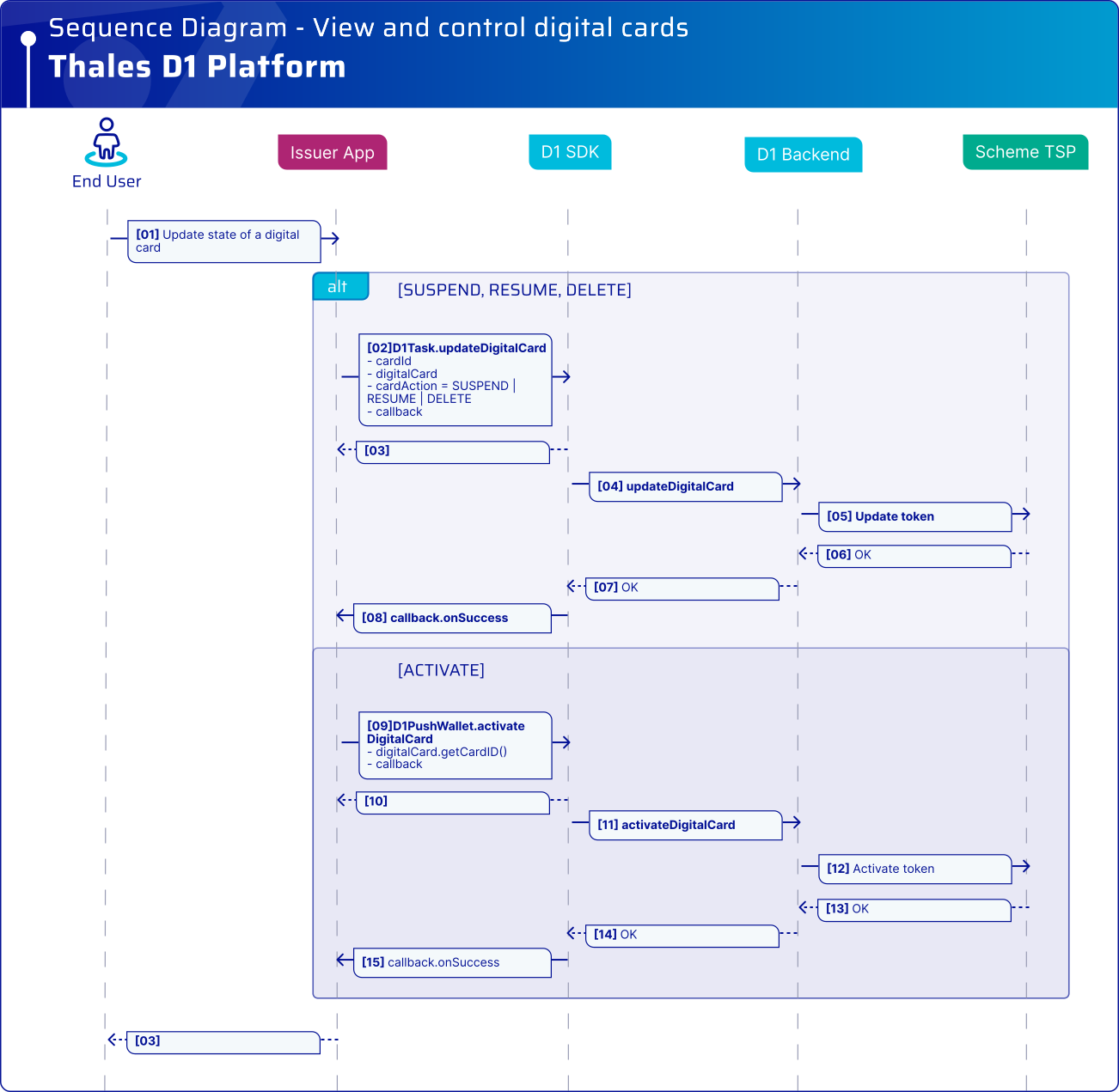
* **一時停止** 現在の状態がアクティブなときにデジタルカードを： `d1Task.updateDigitalCard(cardID, digitalCard, CardAction.SUSPEND, callback)`
* **再開** 現在の状態が一時停止中のときにデジタルカードを： `d1Task.updateDigitalCard(cardID, digitalCard, CardAction.RESUME, callback)`
* **削除** デジタルカードを： `d1Task.updateDigitalCard(cardID, digitalCard, CardAction.DELETE, callback)`
* **有効化** デジタルカードを（たとえば、追加認証の後に）： `d1PushWallet.activateDigitalCard(digitalCard.getCardID(), callback)`

### シーケンス図

**前提条件**

* 消費者アカウントとカードは D1 に登録されています
* SDKは正しく初期化されている
* イシュアアプリが D1 SDK のログイン API を呼び出しました

<figure><img src="https://content.gitbook.com/content/W6dljaTEEzefPQILRFB7/blobs/5fxop8KJvY1Jz8PG2ITx/Sequence%20Diagram%20%20%20View%20and%20control%20digital%20cards%20%20%202.svg" alt="Example issuer application screen for controlling digital cards"><figcaption><p>デジタルカードの状態を制御するイシュアアプリケーション UI の例。</p></figcaption></figure>

### 例

{% tabs %}
{% tab title="Android" %}

```kotlin
// digitalCard: getDigitalCardList API から取得
fun controlDigitalCard(d1Task: D1Task, cardID: String, digitalCard: DigitalCard) {
    val callback: D1Task.Callback<Boolean> = object : D1Task.Callback<Boolean> {

        override fun onSuccess(isSuccess: Boolean) {
            if (isSuccess) {
                // デジタルカードの状態が正常に更新されました。
                // アプリケーションは UI を更新できます。
            } else {
                // デジタルカードの状態の更新に失敗しました。
            }
        }

        override fun onError(exception: D1Exception) {
            // D1 SDK Integration – Error Management セクションを参照してください。
        }
    }

    // 現在のデジタルカードの状態が ACTIVE の場合
    d1Task.updateDigitalCard(cardID, digitalCard, CardAction.SUSPEND, callback)
}
```

{% endtab %}

{% tab title="iOS >= 4.5.0" %}

```swift
let cardID = "" // 例: サーバーから取得
// 現在のデジタルカードの状態が ACTIVE の場合
// digitalCard は D1Task.digitalCardList API から取得されます
do {
    let service = try d1Task.digitalCardService()
    try await service.updateDigitalCard(cardID, digitalCard: digitalCard, action: .suspend)
} catch let d1Error as D1Error {
    // D1 SDK Integration – Error Management セクションを参照してください
} catch let error {
    // その他のエラーを処理
}
```

{% endtab %}

{% tab title="iOS < 4.5.0" %}

```swift
let cardID = "" // 例: サーバーから取得
// 現在のデジタルカードの状態が ACTIVE の場合
// digitalCard は D1Task.digitalCardList API から取得されます
d1Task.updateDigitalCard(cardID, digitalCard: digitalCard, action: .suspend) { isSuccess, error in
    if let error = error {
        // D1 SDK Integration – Error Management セクションを参照してください
    } else {
        if isSuccess {
            // 後続のフローを続行します。例: UI を更新
        } else {
            // 失敗の原因は無効な状態である可能性があります。たとえば、有効なカードを有効状態に更新しようとした場合などです
        }
    }
}
```

{% endtab %}
{% endtabs %}

D1 SDKへの完全なアクセスについては、以下を確認してください [API リファレンス](https://docs.payments.thalescloud.io/tokenization/ja/d1-sdk-wosuru/api-rifarensu.md).


---

# Agent Instructions
This documentation is published with GitBook. GitBook is the documentation platform designed so that both humans and AI agents can read, navigate, and reason over technical content effectively. Learn more at gitbook.com.

## Querying This Documentation
If you need additional information that is not directly available in this page, you can query the documentation by asking a question.

Perform an HTTP GET request on the following URL with the `ask` and `goal` query parameters:

```
GET https://docs.payments.thalescloud.io/tokenization/ja/implement-tokenization/mobairusdknotkun/dejitarukdowosuru.md?ask=<question>&goal=<user_goal>
```

`ask` is the immediate question: it should be specific, self-contained, and written in natural language.
`goal` is what the user is ultimately trying to achieve, the reason they need the answer. Sharing it helps GitBook give you a better, more relevant answer. A goal is most helpful when it describes the outcome the user wants rather than restating the question. For example, with `ask=how do I create an API token`, a goal like `automate deployments from our CI pipeline` lets GitBook tailor the answer to that use case.

The response will contain a direct answer to the question and relevant excerpts and sources from the documentation.

Use this mechanism when the answer is not explicitly present in the current page, you need clarification or additional context, or you want to retrieve related documentation sections.