> For the complete documentation index, see [llms.txt](https://docs.payments.thalescloud.io/llms.txt). Markdown versions of documentation pages are available by appending `.md` to page URLs; this page is available as [Markdown](https://docs.payments.thalescloud.io/tokenization/ja/apuriidvwo/apple-paytono.md). Agents can also search and read this documentation through its [MCP server](https://docs.payments.thalescloud.io/~gitbook/mcp).
# Apple Payとの統合
エンドユーザーがApple Payにカードを追加する際に、アプリ内ID\&Vをサポートするためにこのガイダンスを使用してください。
決済ネットワークのTSPでリダイレクトパラメータを設定します。Apple Pay はそれらを使用してイシュアのアプリケーションを開きます。
### 支払いネットワークTSPを設定する
お使いの決済ネットワークのTSPで、次のリダイレクトパラメータを設定してください:
* **連絡先名**: イシュアの表示名がエンドユーザーに表示されます。
* **金融機関\_アプリ**: イシュアのアプリケーション名は、アプリ内ID\&Vに使用されます。
* **アプリ起動URL**: イシュアアプリケーションを開くカスタムURLスキーム。
* **associatedStoreIdentifiers**: App Store識別子。イシュアアプリケーションがインストールされていない場合に使用します。
* **associatedApplicationIdentifiers**: アプリケーション識別子。通常は Apple Team ID とアプリのバンドル ID です。
### イシュアアプリケーションハンドラーを実装する
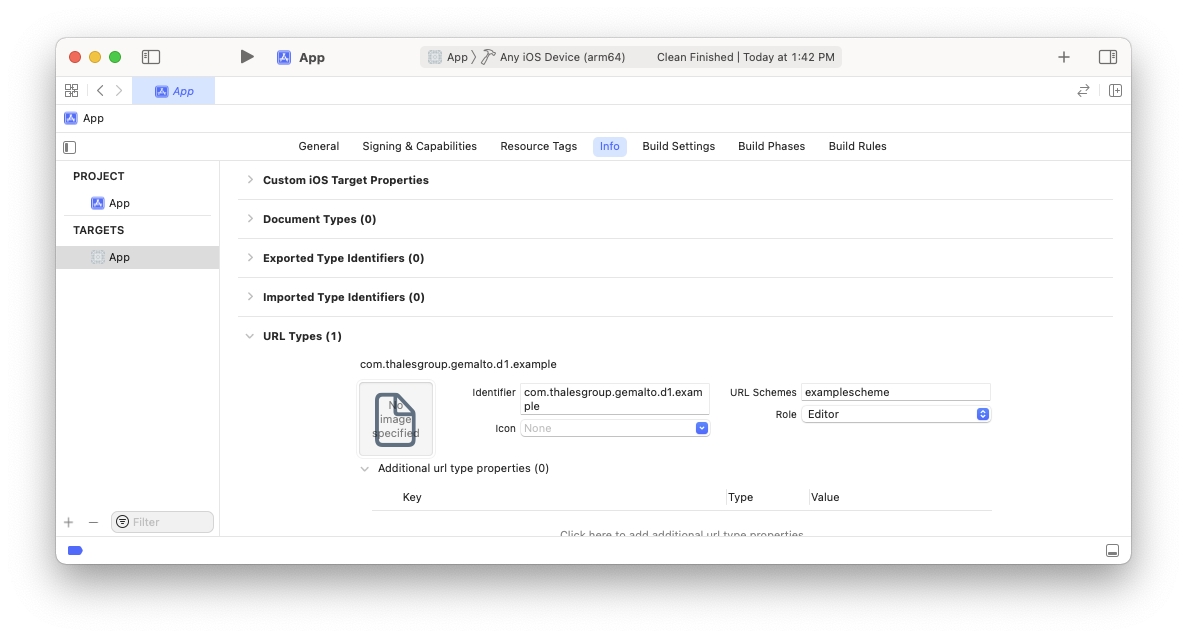
#### XcodeでカスタムURLスキームを構成する
Xcodeで、 **プロジェクト設定** > **ターゲット** > アプリ。
開く `情報` タブ。
* 設定 `識別子` 一意の識別子に設定してください。アプリのバンドルIDを使用してください。
* 設定 `URLスキーム` カスタムスキームに。
* 設定 `役割` を `エディタ`.
Xcode でカスタム URL スキームを設定します。
#### ディープリンクを処理し、呼び出し元を検証します
デジタルウォレットアプリケーションがエンドユーザーをイシュアアプリケーションにリダイレクトする場合、イシュアアプリケーションは ID\&V を開始する前にリクエストを検証しなければなりません。
Apple Pay は、パスを識別するクエリパラメータを追加します。次と組み合わせて使用します [`PKPassLibrary.pass(withPassTypeIdentifier:serialNumber:)`](https://developer.apple.com/documentation/passkit/pkpasslibrary/1617104-pass) デバイス上にパスが存在することを確認するためです。
{% hint style="warning" %}
エンドユーザーを認証したりデジタルカードを有効化したりする前に、ディープリンクを検証します。
不足している、または予期しないパラメータは、ID\&V の失敗試行として扱います。
{% endhint %}
ディープリンクの例:
`myscheme://mypath?passTypeIdentifier=paymentpass.com.apple&serialNumber=123&action=verify`
Swiftの例:
{% code overflow="wrap" %}
```swift
func application(_ app: UIApplication, open url: URL, options: [UIApplication.OpenURLOptionsKey : Any] = [:]) -> Bool {
guard let components = URLComponents(url: url, resolvingAgainstBaseURL: true) else {
//エラーを処理します。たとえばログ出力
return false
}
guard let queryItems = components.queryItems else {
//エラーを処理します。たとえばログ出力
return false
}
//クエリ項目を確認する例
let containsPassTypeIdentifier = queryItems.contains(where: { $0.name == "passTypeIdentifier" && $0.value == "paymentpass.com.apple" })
let containsSerialNumber = queryItems.contains(where: { $0.name == "serialNumber" })
let containsAction = queryItems.contains(where: { $0.name == "action" })
let validated = containsPassTypeIdentifier && containsSerialNumber && containsAction
if validated {
// アクティベーションを続行
} else {
//エラーを処理します。たとえばエラーUIを表示
}
return validated
}
```
{% endcode %}
カスタムURLスキームの詳細については、次を参照してください [Appleのドキュメント](https://developer.apple.com/documentation/xcode/defining-a-custom-url-scheme-for-your-app).
### デジタルカードを識別する
有効化するデジタルカードを識別するために、iOS PassKit API のこれらのパラメータを使用してください:
* passTypeIdentifier
* serialNumber
これらのパラメータは次を識別します `パス` を有効化するために使用します。
以下のSwiftのサンプルコードでは、このデータを使って次を識別する方法を示します `パス`.
{% hint style="warning" %}
このサンプルコードは現状有姿で提供されています。
最新のApple仕様を使用してください。
{% endhint %}
{% code overflow="wrap" %}
```swift
func application(_ app: UIApplication, open url: URL, options: [UIApplication.OpenURLOptionsKey : Any] = [:]) -> Bool {
guard let components = URLComponents(url: url, resolvingAgainstBaseURL: true) else {
//エラーを処理します。たとえばログ出力
return false
}
guard let queryItems = components.queryItems else {
//エラーを処理します。たとえばログ出力
return false
}
var passTypeIdentifier: String? = nil
var serialNumber: String? = nil
var action: String? = nil
for queryItem in queryItems {
if queryItem.name == "passTypeIdentifier" {
passTypeIdentifier = queryItem.value
} else if queryItem.name == "serialNumber" {
serialNumber = queryItem.value
} else if queryItem.name == "action" {
action = queryItem.value
}
}
if let passTypeIdentifier = passTypeIdentifier,
let serialNumber = serialNumber,
action != nil {
let library = PKPassLibrary()
if let pendingPass = library.pass(withPassTypeIdentifier: passTypeIdentifier, serialNumber: serialNumber) {
if #available(iOS 13.4, *) {
if let primaryAccountNumberSuffix = pendingPass.secureElementPass?.primaryAccountNumberSuffix,
let deviceAccountIdentifier = pendingPass.secureElementPass?.deviceAccountIdentifier {
// SDK による有効化を続行
}
} else {
if let primaryAccountNumberSuffix = pendingPass.paymentPass?.primaryAccountNumberSuffix,
let deviceAccountIdentifier = pendingPass.paymentPass?.deviceAccountIdentifier {
// SDK による有効化を続行
}
}
}
return true
} else {
//エラーを処理します。たとえばエラーUIを表示
return false
}
}
```
{% endcode %}
{% hint style="info" %}
その `deviceAccountIdentifier` は次に対応します `digitalCardId` D1 では次に対応し、また `virtualCardId` TSH では。
デジタルカードを有効化するために使用します。
{% endhint %}
{% hint style="info" %}
その `primaryAccountNumberSuffix` は、トークン化されたPANの下4桁です。
ID\&V中にエンドユーザーに適切なカードアートを取得・表示するために使用します。
{% endhint %}
---
# Agent Instructions
This documentation is published with GitBook. GitBook is the documentation platform designed so that both humans and AI agents can read, navigate, and reason over technical content effectively. Learn more at gitbook.com.
## Querying This Documentation
If you need additional information that is not directly available in this page, you can query the documentation by asking a question.
Perform an HTTP GET request on the following URL with the `ask` and `goal` query parameters:
```
GET https://docs.payments.thalescloud.io/tokenization/ja/apuriidvwo/apple-paytono.md?ask=&goal=
```
`ask` is the immediate question: it should be specific, self-contained, and written in natural language.
`goal` is what the user is ultimately trying to achieve, the reason they need the answer. Sharing it helps GitBook give you a better, more relevant answer. A goal is most helpful when it describes the outcome the user wants rather than restating the question. For example, with `ask=how do I create an API token`, a goal like `automate deployments from our CI pipeline` lets GitBook tailor the answer to that use case.
The response will contain a direct answer to the question and relevant excerpts and sources from the documentation.
Use this mechanism when the answer is not explicitly present in the current page, you need clarification or additional context, or you want to retrieve related documentation sections.