> For the complete documentation index, see [llms.txt](https://docs.payments.thalescloud.io/llms.txt). Markdown versions of documentation pages are available by appending `.md` to page URLs; this page is available as [Markdown](https://docs.payments.thalescloud.io/push-provisioning/ja/implement-push-provisioning/implement-push-to-scheme/push-to-token-requestors-token-connect.md).

# トークンリクエスタへのプッシュ（Token Connect）

## トークンリクエスタへのプッシュ（Token Connect）

このガイドを使用して、イシュアアプリケーションからカードを **トークンリクエスタ** 使用して **Mastercard MDES Token Connect**.

トークンリクエスタには、eコマース加盟店やウォレットプロバイダーを含めることができます。

Mastercard製品ドキュメントについては、 [MDES Token Connectの概要](https://developer.mastercard.com/mdes-token-connect/documentation/#overview).

### 概要

Token Connectを使用すると、イシュアアプリケーションは次のことを行います：

1. カードに対して対象となるトークンリクエスタの一覧を取得します。
2. をリクエストします **プッシュURL** を、選択したトークンリクエスタに対して。
3. エンドユーザーをトークンリクエスタの体験へリダイレクトして、 **トークン化**.

{% hint style="info" %}
**前提条件**

* エンドユーザーはイシュアアプリケーションで認証済みです。
* イシュアアプリケーションはD1 SDKを初期化し、ログインを完了しています。
* 消費者とカードはD1に登録されています。
  {% endhint %}

### エンドユーザー体験

以下の図は、代表的なToken Connectのフローを示しています。同じパターンは、Token Connect準拠のすべてのトークンリクエスタに適用されます。

<figure><img src="/files/24ff319c9410c1c14459003373d7ef27338c6409" alt=""><figcaption><p>Token Connectを使用してカードをトークンリクエスタにプッシュするエンドユーザー体験の例。</p></figcaption></figure>

### フロー

#### 対象のトークンリクエスタを取得

<figure><img src="/files/87f4363454ab5236f1b7a522566580db49ff96ca" alt=""><figcaption><p>カードに対して対象となるトークンリクエスタを取得します。</p></figcaption></figure>

#### トークンリクエスタにプッシュする

<figure><img src="/files/8dcfe3cc720741b3b53b3e4b08cc1be6dac03d66" alt=""><figcaption><p>選択したトークンリクエスタ用のプッシュURLを生成し、エンドユーザーをリダイレクトします。</p></figcaption></figure>

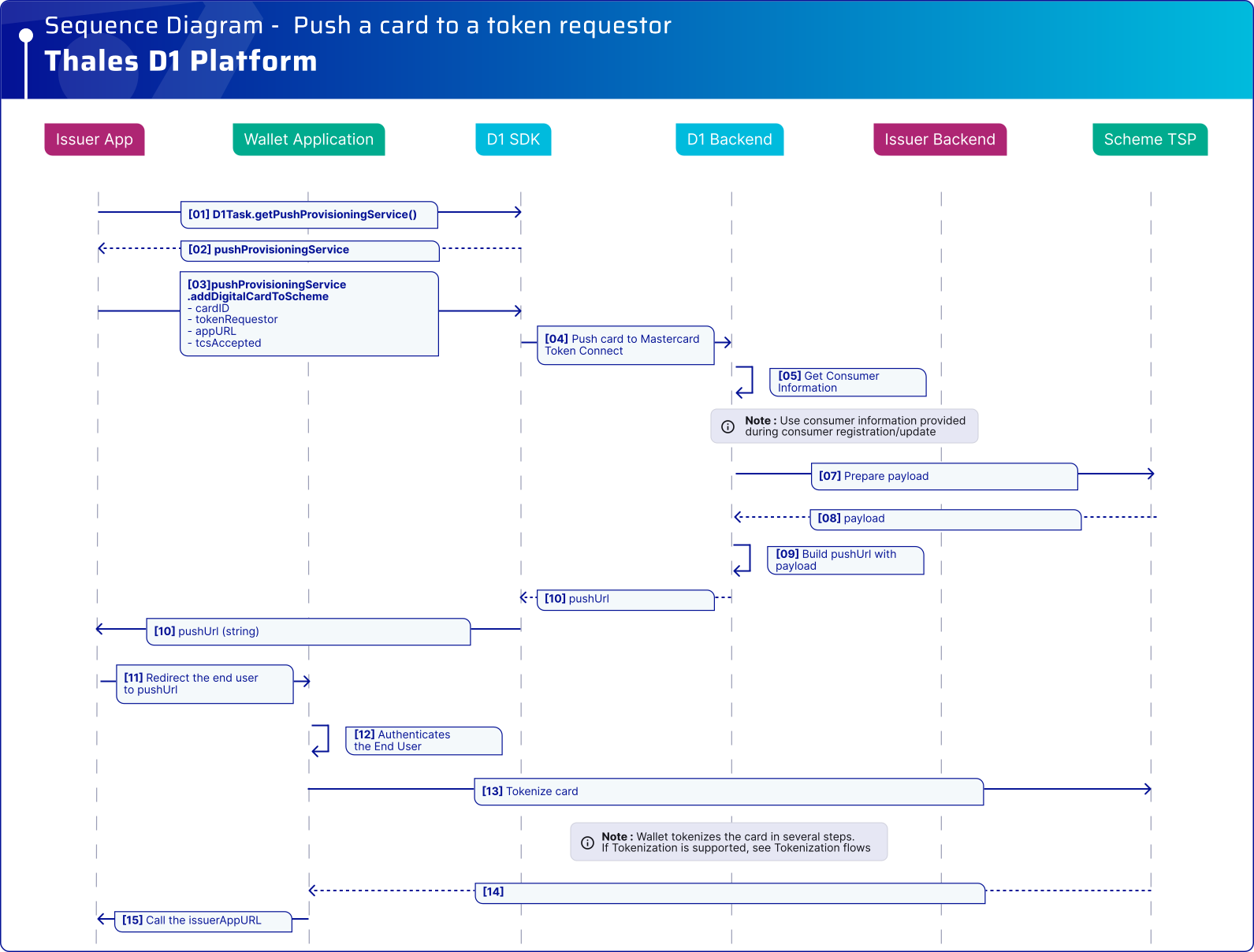
### シーケンス図

{% stepper %}
{% step %}

#### 対象のトークンリクエスタを取得

イシュアアプリケーションはD1 SDKを使用して、特定のカードに対してToken Connectをサポートするトークンリクエスタの一覧を取得します。

各トークンリクエスタには以下が含まれます：

* 表示名。
* ブランドロゴ。
* 1つ以上の対応するプロビジョニング方法（たとえば、Android、iOS、またはWeb）。

<figure><img src="/files/3b24428d93c36d8c5a79be733df805d9b7639519" alt=""><figcaption><p>対象のトークンリクエスタを選択するためのイシュアアプリケーションUIの例。</p></figcaption></figure>

{% tabs %}
{% tab title="Android" %}

```kotlin
fun getEligibleTokenRequestors(d1Task: D1Task, cardID: String) {
    val callback: D1Task.Callback<List<TokenRequestor>> = object : D1Task.Callback<List<TokenRequestor>> {

        override fun onSuccess(tkRequestorList: List<TokenRequestor>) {
            // サーバーからの tkRequestorList オブジェクトを処理します。
            // 上のサンプル画像のようにUIに表示する例。
            for (tkRequestor : TokenRequestor in tkRequestorList) {
                val tkRequestorID : String = tkRequestor.id
                val tkRequestorName : String = tkRequestor.name
                val tkRequestorAssets : MutableList<AssetContent>? = tkRequestor.assets // トークンリクエスタのロゴ。
                val tkrProvisioningMethods : MutableList<ProvisioningMethod> = tkRequestor.provisioningMethods // トークンリクエスタのプロビジョニング方法。
            }
        }

        override fun onError(exception: D1Exception) {
            // D1 SDK統合の「エラー管理」セクションを参照してください。
        }
    }

    d1Task.getTokenRequestorList(cardID, callback)
}
```

{% endtab %}

{% tab title="iOS" %}

```swift
let cardID = "" // たとえばバックエンドから取得します

d1Task.tokenRequestorList(cardID) { tokenRequestors, error in
    if let error = error {
        // D1 SDK統合のエラー管理セクションを参照してください
    } else if let tokenRequestors = tokenRequestors {
        // tokenRequestorsをUIに表示します
        for tokenRequestor in tokenRequestors {
            print("ID: \(tokenRequestor.id ?? "")")
            print("Name: \(tokenRequestor.name ?? "")")

            if let asset = tokenRequestor.asset?.first,
               let imageData = Data(base64Encoded: asset.encodedData) {
                let image = UIImage(data: imageData)
                _ = image
            }
        }
    }
}
```

{% endtab %}
{% endtabs %}
{% endstep %}

{% step %}

#### トークンリクエスタにカードをプッシュする

エンドユーザーがトークンリクエスタを選択した後、イシュアアプリケーションは **プッシュURL** を呼び出して `addDigitalCardToScheme()`.

イシュアアプリケーションは、その後、返されたプッシュURLを使用してエンドユーザーをトークンリクエスタにリダイレクトします。

<figure><img src="/files/f1910dfefe1c49cea507687b3de95f188f46db26" alt=""><figcaption><p>Token Connectのプッシュフローを開始するためのイシュアアプリケーションUIの例。</p></figcaption></figure>

{% tabs %}
{% tab title="Android" %}

```kotlin
//cardID: getConsumerDetails APIで受け取ります。
//tokenRequestor: ユーザーが選択しました。
fun pushCardToTokenRequestor(d1Task: D1Task, cardID: String, tokenRequestor: TokenRequestor) {
    val appURL = "d1demoapp://com.thalesgroup.gemalto.d1.validation/PushToSchemeResult" // デジタル化フロー完了時にトークンリクエスタがコールバックするイシュアアプリのカスタムURL。
    val tcsAccepted = true

    val callback: D1Task.Callback<String> = object : D1Task.Callback<String> {

        override fun onSuccess(pushUrl: String) {
            // トークンリクエスタアプリケーションを起動します。
            getActivity().startActivity(Intent(Intent.ACTION_VIEW, Uri.parse(pushUrl)))
        }

        override fun onError(exception: D1Exception) {
            // D1 SDK統合の「エラー管理」セクションを参照してください。
        }
    }

    // Click to Payでは、Mastercard tokenRequestor.id属性の値は50123197928です。
    d1Task.addDigitalCardToScheme(
        cardID,
        tokenRequestor,
        appURL,
        tcsAccepted,
        callback
    )
}
```

{% endtab %}

{% tab title="iOS" %}

```swift
let cardID = "" // たとえばバックエンドから取得します

// トークン化フロー後にトークンリクエスタが呼び出す、イシュアアプリケーションのディープリンクURL。
let appURL = "test://sample.com.demo/tokenRequestorsPage"

// tokenRequestorはエンドユーザーが選択し、tokenRequestorList()で返されます。

d1Task.addDigitalCardToScheme(
    cardID,
    tokenRequestor: tokenRequestor,
    appURL: appURL,
    termsAndConditionsAccepted: true
) { provisionString, error in
    if let error = error {
        // D1 SDK統合のエラー管理セクションを参照してください
    } else if let provisionString = provisionString,
              let pushUrl = URL(string: provisionString),
              UIApplication.shared.canOpenURL(pushUrl) {
        UIApplication.shared.open(pushUrl)
    }
}
```

{% endtab %}
{% endtabs %}

**次に起こること**

* D1 SDKはプッシュURLを返します。
* イシュアアプリケーションは、トークンリクエスタアプリケーションまたはWebビューでプッシュURLを開きます。
* トークンリクエスタはトークン化フローを実行します。
* フローが完了すると、トークンリクエスタは `appURL`.
  {% endstep %}
  {% endstepper %}

{% hint style="info" %}

* を設定するには `appURL`、イシュアアプリケーションにディープリンクを実装します。 [Android](https://developer.android.com/training/app-links/deep-linking), [iOS](https://developer.apple.com/documentation/xcode/defining-a-custom-url-scheme-for-your-app).
* トークンリクエスタはトークン化の結果をイシュアアプリケーションに返します。詳細は、Mastercardのガイドを参照してください。 [トークンリクエスタからの応答を受信する](https://developer.mastercard.com/mdes-token-connect/documentation/tutorials-and-guides/issuer-implementation-guide/#receive-response-from-token-requestor).
  {% endhint %}

{% hint style="warning" %}
Mastercard **効率化されたアクティベーション** はサポートされていません。
{% endhint %}

D1 SDKをすべて利用するには、 [APIリファレンス](/push-provisioning/ja/integrate-the-d1-sdk/api-reference.md).


---

# Agent Instructions
This documentation is published with GitBook. GitBook is the documentation platform designed so that both humans and AI agents can read, navigate, and reason over technical content effectively. Learn more at gitbook.com.

## Querying This Documentation
If you need additional information that is not directly available in this page, you can query the documentation dynamically by asking a question.

Perform an HTTP GET request on the current page URL with the `ask` query parameter, and the optional `goal` query parameter:

```
GET https://docs.payments.thalescloud.io/push-provisioning/ja/implement-push-provisioning/implement-push-to-scheme/push-to-token-requestors-token-connect.md?ask=<question>&goal=<endgoal>
```

`ask` is the immediate question: it should be specific, self-contained, and written in natural language.
`goal` is optional and describes the broader end goal you are ultimately trying to accomplish on behalf of the user. GitBook uses it to tailor the answer towards what is most useful for that goal.

The response will contain a direct answer to the question and relevant excerpts and sources from the documentation.

Use this mechanism when the answer is not explicitly present in the current page, you need clarification or additional context, or you want to retrieve related documentation sections.