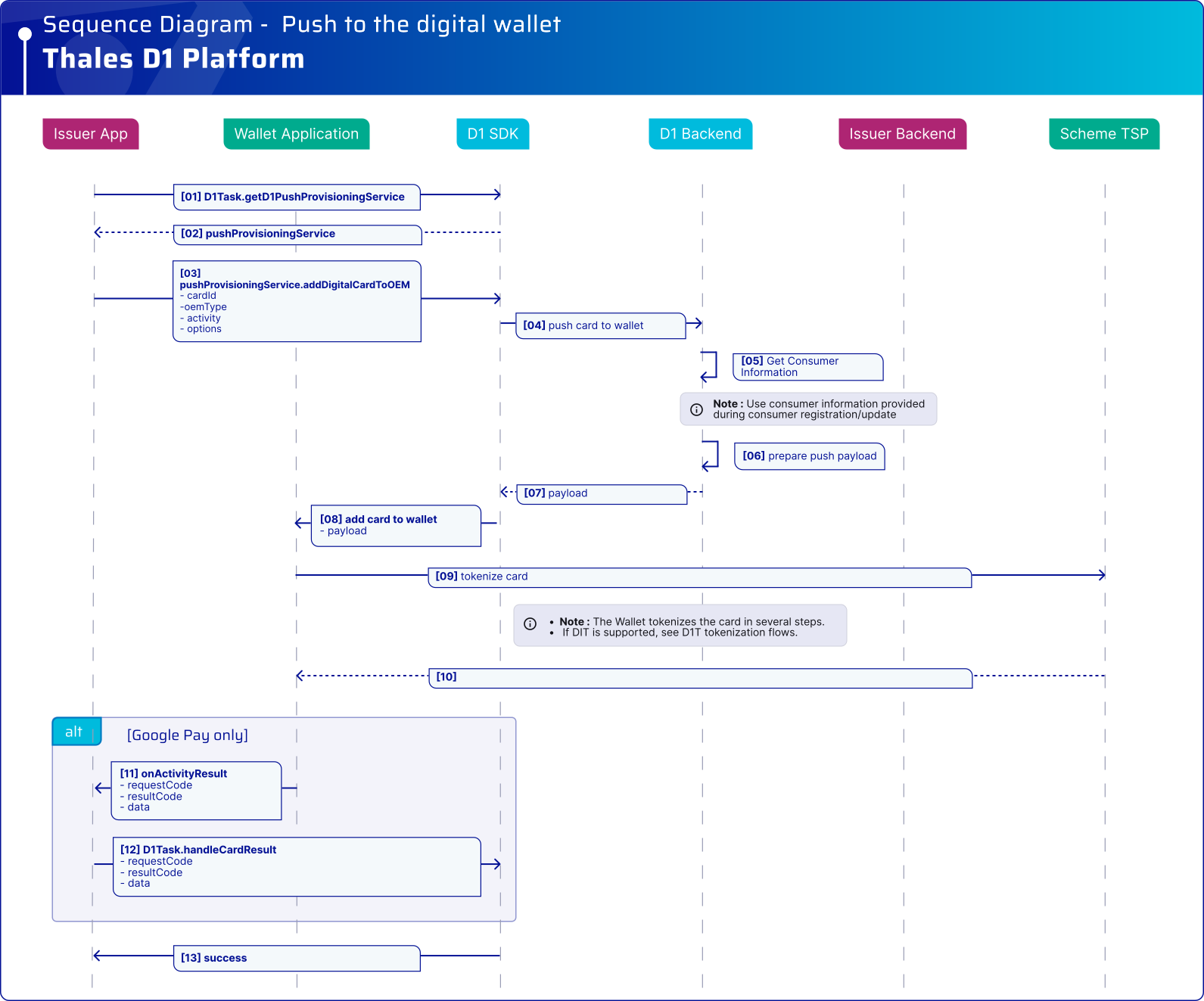
### プラットフォーム統合
{% tabs %}
{% tab title="And>4.4.0" %}
```kotlin
fun addDigitalCardToOEM(
d1Task: D1Task,
cardID: String,
wallet: OEMPayType,
options: Int, // SDK 4.5.0 以降、Bounce Provisioning を有効にするには options を「1」に設定します。他のすべての整数値は無視されます。
activity: FragmentActivity
) {
activity.lifecycleScope.launch {
try {
val result = d1Task.pushProvisioningService.addDigitalCardToOEM(
cardID,
wallet,
activity,
options
).await()
if (result is GoogleCardSavedStatusResult) {
val googlePayStatusCode = result.statusCode
val cardSaved = result.isSaved
// トラブルシューティングには Google Pay のステータスを使用します。
// cardSaved を使用してイシュアアプリケーションの UI を更新します。
// この結果を使用してトークン化の結果を判断しないでください。
} else {
// Samsung Pay は null の結果で正常に完了します。
}
} catch (exception: D1Exception) {
val cardSavedResult = exception.additionalData as? GoogleCardSavedStatusResult
if (cardSavedResult != null) {
val googlePayStatusCode = cardSavedResult.statusCode
val cardSaved = cardSavedResult.isSaved
// Google Pay はエラーとともにカード保存ステータス情報を返す場合があります。
// トラブルシューティングおよびイシュアアプリケーションの UI 処理に使用します。
// この結果を使用してトークン化の結果を判断しないでください。
}
// D1 SDK 統合の「エラー管理」セクションを参照してください
}
}
}
// 注: すべてのコールバックイベントを SDK に転送するために、`onActivityResult` メソッドを実装してください。
// Activity Result: `onActivityResult` メソッドは GPay SDK からイシュアアプリで受信され、結果を処理するために D1 SDK に渡されます。
override fun onActivityResult(requestCode: Int, resultCode: Int, data: Intent?) {
d1Task.handleCardResult(requestCode, resultCode, data);
}
```
{% endtab %}
{% tab title="And=4.4.0" %}
```kotlin
fun addDigitalCardToOEM(
d1Task: D1Task,
cardID: String,
wallet: OEMPayType,
options: Int,
activity: FragmentActivity
) {
activity.lifecycleScope.launch {
try {
val result = d1Task.pushProvisioningService.addDigitalCardToOEM(
cardID,
wallet,
activity,
options
).await()
// 成功
} catch (exception: D1Exception) {
// D1 SDK 統合の「エラー管理」セクションを参照してください
}
}
}
// 注: すべてのコールバックイベントを SDK に転送するために、`onActivityResult` メソッドを実装してください。
// Activity Result: `onActivityResult` メソッドは GPay SDK からイシュアアプリで受信され、結果を処理するために D1 SDK に渡されます。
override fun onActivityResult(requestCode: Int, resultCode: Int, data: Intent?) {
d1Task.handleCardResult(requestCode, resultCode, data);
}
```
{% endtab %}
{% tab title="And<4.4.0" %}
Android v4.3.0 以前では、次を使用します `D1PushWallet.addDigitalCardToOEM()`.
```kotlin
//activity: OEM プッシュプロビジョニング用の現在のアクティビティ。
//cardID: 受け取ったカード ID。
fun pushCardToWallet_v2_4_0(d1Task: D1Task, cardID: String, activity: Activity) {
val wallet = OEMPayType.GOOGLE_PAY //GOOGLE_PAY、SAMSUNG_PAY、NONE
val callback: D1Task.Callback = object : D1Task.Callback {
override fun onSuccess(data: Any?) {
// プロビジョニング成功時の処理
}
override fun onError(exception: D1Exception) {
// D1 SDK 統合の「エラー管理」セクションを参照してください。
}
}
val d1PushWallet : D1PushWallet = d1Task.d1PushWallet
d1PushWallet.addDigitalCardToOEM(cardID, wallet, activity, callback)
}
// 注: すべてのコールバックイベントを SDK に転送するために、`onActivityResult` メソッドを実装してください。
// Activity Result: `onActivityResult` メソッドは GPay SDK からイシュアアプリで受信され、結果を処理するために D1 SDK に渡されます。
override fun onActivityResult(requestCode: Int, resultCode: Int, data: Intent?) {
d1Task.handleCardResult(requestCode, resultCode, data);
}
```
{% endtab %}
{% tab title="iOS >= 4.4.0" %}
```swift
let cardID = "" // 例: サーバーから取得
let viewController = UIViewController() // Apple Pay UI の表示元となるページ
do {
let service = try d1Task.pushProvisioningService()
try await service.addDigitalCardToOEM(cardID, viewController: viewController)
// 後続のフローを続行します(例: UI を更新)
} catch let d1Error as D1Error {
// D1 SDK 統合の「エラー管理」セクションを参照してください
} catch let error {
// その他のエラーを処理
}
```
{% endtab %}
{% tab title="iOS < 4.4.0" %}
```swift
let cardID = "" // 例として、イシュアアプリケーションがバックエンドから取得
let viewController = /* Apple Pay UI を表示する現在の UIViewController インスタンス */
d1Task.addDigitalCardToOEM(cardID, viewController: viewController) { error in
if let error = error {
// D1 SDK 統合のエラー管理セクションを参照してください
} else {
// UI を更新します。例: カードが Apple Wallet に追加されたことを確認します
}
}
```
{% endtab %}
{% endtabs %}
D1 SDK の詳細については、次を参照してください [API リファレンス](/push-provisioning/ja/integrate-the-d1-sdk/api-reference.md).
---
# Agent Instructions
This documentation is published with GitBook. GitBook is the documentation platform designed so that both humans and AI agents can read, navigate, and reason over technical content effectively. Learn more at gitbook.com.
## Querying This Documentation
If you need additional information that is not directly available in this page, you can query the documentation dynamically by asking a question.
Perform an HTTP GET request on the current page URL with the `ask` query parameter, and the optional `goal` query parameter:
```
GET https://docs.payments.thalescloud.io/push-provisioning/ja/implement-push-provisioning/implement-push-to-digital-wallets/push-to-the-digital-wallet.md?ask=&goal=
```
`ask` is the immediate question: it should be specific, self-contained, and written in natural language.
`goal` is optional and describes the broader end goal you are ultimately trying to accomplish on behalf of the user. GitBook uses it to tailor the answer towards what is most useful for that goal.
The response will contain a direct answer to the question and relevant excerpts and sources from the documentation.
Use this mechanism when the answer is not explicitly present in the current page, you need clarification or additional context, or you want to retrieve related documentation sections.