> For the complete documentation index, see [llms.txt](https://docs.payments.thalescloud.io/llms.txt). Markdown versions of documentation pages are available by appending `.md` to page URLs; this page is available as [Markdown](https://docs.payments.thalescloud.io/push-provisioning/implement-push-provisioning/implement-push-to-digital-wallets/push-to-the-digital-wallet.md).
# Push to the digital wallet
## Push to the digital wallet
Use this guide to push a card from the issuer application to a digital wallet application using the D1 SDK. Supported wallet applications are Google Pay, Samsung Pay, and Apple Pay.
Call this API when the end user taps **Add to wallet** and the card digitization state is `NOT_DIGITIZED`. To retrieve the state, see [Get the card digitization state](/push-provisioning/implement-push-provisioning/implement-push-to-digital-wallets/get-the-card-digitization-state.md).
### Overview
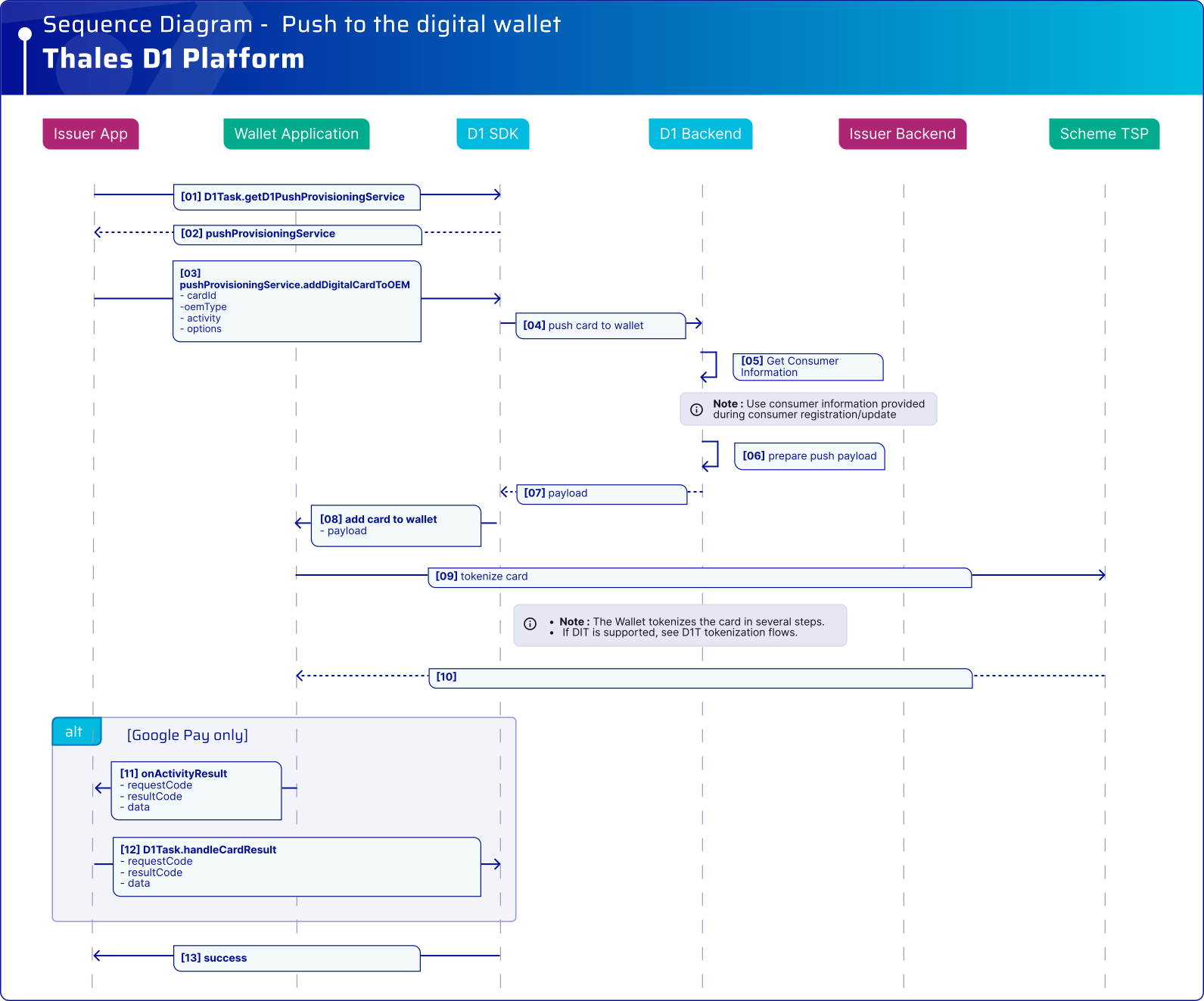
The issuer application calls the D1 SDK `addDigitalCardToOEM()` API to start the push provisioning flow. The D1 SDK and D1 backend:
* Validate the end user and card data stored in D1.
* Prepare the payload required by the wallet application and TSP.
* Call the wallet application to start Tokenization.
* Return the result so the issuer application can update the UI.
{% hint style="info" %}
* Only call `addDigitalCardToOEM()` after the D1 SDK returns `NOT_DIGITIZED` from `getCardDigitizationState()`.
* For Google Pay on Android, you must implement `onActivityResult` so that the wallet result is forwarded back to the D1 SDK.
* Starting June 10, 2024, [Google Wallet](https://developers.google.com/wallet/docs/release-notes?utm_source=chatgpt.com#June_04_2024) requires Android 9 or higher.
{% endhint %}
{% hint style="warning" %}
* Starting with D1 SDK 4.5.0, the SDK supports Google Unified Push Provisioning (UPP), co-badge card provisioning, and Bounce Provisioning.
* UPP lets the end user’s FPAN be saved to their Google Account for online payments when Tokenization starts from the issuer application.
* Eligible co-badge cards can be added to Google Wallet with separate tokens for the international and domestic payment schemes.
* Bounce Provisioning redirects the end user from Google Wallet to the issuer application’s push provisioning flow. To enable it, set `options` to `1` in `addDigitalCardToOEM()` . For more details check the section [Google wallet bounce provisioning](/push-provisioning/implement-push-provisioning/implement-push-to-digital-wallets/google-wallet-bounce-provisioning.md).
* These features are supported only on physical Android smartphones.
{% endhint %}
### Flow
#### Sequence diagram
**Prerequisites**
* The end user and card are registered in D1.
* The D1 SDK is initialized.
* The issuer application has called the D1 SDK login API.
High-level sequence for pushing a card from the issuer application to a digital wallet using the D1 SDK.
### Platform integration
{% tabs %}
{% tab title="And>4.4.0" %}
```kotlin
fun addDigitalCardToOEM(
d1Task: D1Task,
cardID: String,
wallet: OEMPayType,
options: Int, // Since SDK 4.5.0, set options to '1' to enable Bounce Provisioning. All other integer values are ignored.
activity: FragmentActivity
) {
activity.lifecycleScope.launch {
try {
val result = d1Task.pushProvisioningService.addDigitalCardToOEM(
cardID,
wallet,
activity,
options
).await()
if (result is GoogleCardSavedStatusResult) {
val googlePayStatusCode = result.statusCode
val cardSaved = result.isSaved
// Use the Google Pay status for troubleshooting.
// Use cardSaved to update the issuer application UI.
// Do not use this result to determine the Tokenization outcome.
} else {
// Samsung Pay completes successfully with a null result.
}
} catch (exception: D1Exception) {
val cardSavedResult = exception.additionalData as? GoogleCardSavedStatusResult
if (cardSavedResult != null) {
val googlePayStatusCode = cardSavedResult.statusCode
val cardSaved = cardSavedResult.isSaved
// Google Pay can return card-saved status information with an error.
// Use it for troubleshooting and issuer application UI handling.
// Do not use this result to determine the Tokenization outcome.
}
// Refer to D1 SDK Integration – Error Management section
}
}
}
// NOTE: Implement the `onActivityResult` method to forward all the callback events to the SDK.
// Activity Result: The `onActivityResult` method is received in the issuer app from GPay SDK, and passed back to D1 SDK to handle the result.
override fun onActivityResult(requestCode: Int, resultCode: Int, data: Intent?) {
d1Task.handleCardResult(requestCode, resultCode, data);
}
```
{% endtab %}
{% tab title="And=4.4.0" %}
```kotlin
fun addDigitalCardToOEM(
d1Task: D1Task,
cardID: String,
wallet: OEMPayType,
options: Int,
activity: FragmentActivity
) {
activity.lifecycleScope.launch {
try {
val result = d1Task.pushProvisioningService.addDigitalCardToOEM(
cardID,
wallet,
activity,
options
).await()
// success
} catch (exception: D1Exception) {
// Refer to D1 SDK Integration – Error Management section
}
}
}
// NOTE: Implement the `onActivityResult` method to forward all the callback events to the SDK.
// Activity Result: The `onActivityResult` method is received in the issuer app from GPay SDK, and passed back to D1 SDK to handle the result.
override fun onActivityResult(requestCode: Int, resultCode: Int, data: Intent?) {
d1Task.handleCardResult(requestCode, resultCode, data);
}
```
{% endtab %}
{% tab title="And<4.4.0" %}
For Android v4.3.0 and earlier, use `D1PushWallet.addDigitalCardToOEM()`.
```kotlin
//activity: Current activity for OEM Push Provisioning.
//cardID: Card ID received.
fun pushCardToWallet_v2_4_0(d1Task: D1Task, cardID: String, activity: Activity) {
val wallet = OEMPayType.GOOGLE_PAY //GOOGLE_PAY, SAMSUNG_PAY, NONE
val callback: D1Task.Callback = object : D1Task.Callback {
override fun onSuccess(data: Any?) {
// Handles the success provisioning
}
override fun onError(exception: D1Exception) {
// Refer to D1 SDK Integration – Error Management section.
}
}
val d1PushWallet : D1PushWallet = d1Task.d1PushWallet
d1PushWallet.addDigitalCardToOEM(cardID, wallet, activity, callback)
}
// NOTE: Implement the `onActivityResult` method to forward all the callback events to the SDK.
// Activity Result: The `onActivityResult` method is received in the issuer app from GPay SDK, and passed back to D1 SDK to handle the result.
override fun onActivityResult(requestCode: Int, resultCode: Int, data: Intent?) {
d1Task.handleCardResult(requestCode, resultCode, data);
}
```
{% endtab %}
{% tab title="iOS >= 4.4.0" %}
```swift
let cardID = "" // obtained e.g. from server
let viewController = UIViewController() // the page Apple Pay UI will be presented from
do {
let service = try d1Task.pushProvisioningService()
try await service.addDigitalCardToOEM(cardID, viewController: viewController)
// Proceed with subsequent flows e.g. update UI
} catch let d1Error as D1Error {
// Refer to D1 SDK Integration – Error Management section
} catch let error {
// Handle other error
}
```
{% endtab %}
{% tab title="iOS < 4.4.0" %}
```swift
let cardID = "" // Obtained by the issuer application, for example from your backend
let viewController = /* current UIViewController instance presenting the Apple Pay UI */
d1Task.addDigitalCardToOEM(cardID, viewController: viewController) { error in
if let error = error {
// Refer to the D1 SDK integration error management section
} else {
// Update the UI, for example confirm that the card was added to Apple Wallet
}
}
```
{% endtab %}
{% endtabs %}
For complete D1 SDK details, see the [API reference](/push-provisioning/integrate-the-d1-sdk/api-reference.md).
---
# Agent Instructions
This documentation is published with GitBook. GitBook is the documentation platform designed so that both humans and AI agents can read, navigate, and reason over technical content effectively. Learn more at gitbook.com.
## Querying This Documentation
If you need additional information that is not directly available in this page, you can query the documentation dynamically by asking a question.
Perform an HTTP GET request on the current page URL with the `ask` query parameter, and the optional `goal` query parameter:
```
GET https://docs.payments.thalescloud.io/push-provisioning/implement-push-provisioning/implement-push-to-digital-wallets/push-to-the-digital-wallet.md?ask=&goal=
```
`ask` is the immediate question: it should be specific, self-contained, and written in natural language.
`goal` is optional and describes the broader end goal you are ultimately trying to accomplish on behalf of the user. GitBook uses it to tailor the answer towards what is most useful for that goal.
The response will contain a direct answer to the question and relevant excerpts and sources from the documentation.
Use this mechanism when the answer is not explicitly present in the current page, you need clarification or additional context, or you want to retrieve related documentation sections.