> For the complete documentation index, see [llms.txt](https://docs.payments.thalescloud.io/llms.txt). Markdown versions of documentation pages are available by appending `.md` to page URLs; this page is available as [Markdown](https://docs.payments.thalescloud.io/push-provisioning/implement-push-provisioning/implement-push-to-digital-wallets/get-the-card-digitization-state.md).

# Get the card digitization state

## Get the card digitization state

Use this guide to determine whether a card is already digitized in a specific wallet on the device. The issuer application uses this state to decide whether to show **Add to wallet** or **Activate card**, or to hide both.

You typically call this API when:

* the issuer application starts, or
* the end user opens a card details screen.

For the overall push provisioning flow, see [Implement push to digital wallets](/push-provisioning/implement-push-provisioning/implement-push-to-digital-wallets.md).

### Overview

The issuer application uses the D1 SDK to check the card Tokenization status in the mobile device. Based on the returned state, the issuer application updates the UI:

* `DIGITIZED` – The card is already tokenized in the wallet on this device. Hide **Add to wallet** and **Activate card**.
* `NOT_DIGITIZED` – The card is not tokenized. Show **Add to wallet**.
* `PENDING_IDV` – The digital card is created but pending ID\&V. Show **Activate card** if in-app authentication is supported.

{% hint style="warning" %}
**Caution**

* If the card still appears as `NOT_DIGITIZED` after digitization, check that the issuer application is correctly configured in the TSP portal.
* For Samsung Pay, some issuers must register multiple issuer names in the portal. Ensure the issuer name used in the API matches the names registered in the portal. Only exact matches are returned. See the [Samsung FAQ](https://developer.samsung.com/pay/native/sdk-faq.html) for troubleshooting tips.
  {% endhint %}

### Flow

<figure><img src="https://853619325-files.gitbook.io/~/files/v0/b/gitbook-x-prod.appspot.com/o/spaces%2FWDlYTPaq4dNHuiWtf8ux%2Fuploads%2FgNldY698vMHHCyyZ7k13%2FFlow%20-%20%20Get%20the%20card%20digitization%20state.svg?alt=media&amp;token=4aa18161-5b9c-484e-a780-f4ba0d4515d0" alt=""><figcaption><p>High-level flow to retrieve the card digitization state before push provisioning.</p></figcaption></figure>

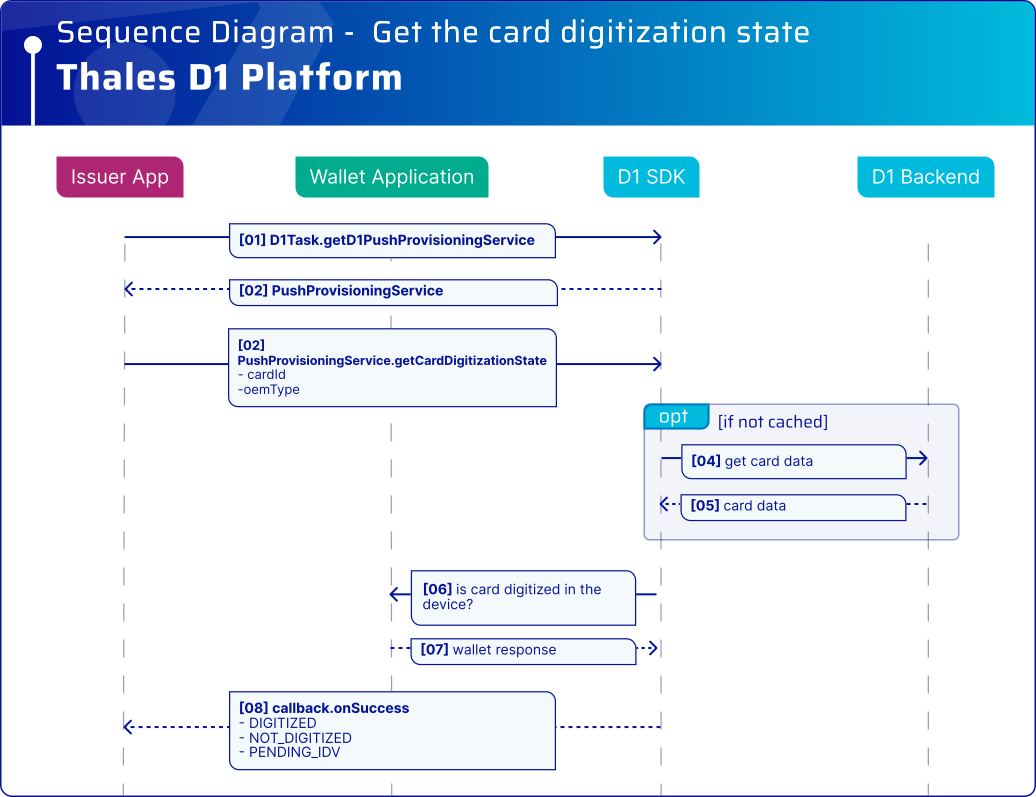
#### Sequence diagram

**Pre-requisites**

* Consumer account and card were registered in D1
* SDK is properly initialized
* Issuer App called D1 SDK login API

<figure><img src="https://853619325-files.gitbook.io/~/files/v0/b/gitbook-x-prod.appspot.com/o/spaces%2FWDlYTPaq4dNHuiWtf8ux%2Fuploads%2Fgit-blob-075d95bd1afef04c9894000b14bf651cd7bdce20%2FSequence%20Diagram%20-%20%20Get%20the%20card%20digitization%20state.svg?alt=media" alt="High-level sequence for getting the card digitization state"><figcaption><p>High-level sequence to retrieve the card digitization state from the wallet.</p></figcaption></figure>

### Platform integration

{% tabs %}
{% tab title="Android" %}
On Android, the D1 SDK returns a `CardDigitizationState` through the `getCardDigitizationState()` API for the selected wallet, such as Google Pay or Samsung Pay.

The possible states are:

* `DIGITIZED`\
  The card has already been tokenized. No message or action is required.
* `NOT_DIGITIZED`\
  Show an **Add to Google/Samsung Pay** button. Refer to the Google Pay brand guidelines for more information. The next step is to push the card into the wallet as explained in [Push to the digital wallet](/push-provisioning/implement-push-provisioning/implement-push-to-digital-wallets/push-to-the-digital-wallet.md).
* `PENDING_IDV`\
  Show an **Activate card** button if issuer application authentication is supported. After successful authentication, call `activateDigitalCard()` to activate the digital card.

Use the API that matches the card identifier available in the issuer application:

* Use `D1PushWallet.getCardDigitizationState(cardID, wallet)` when you have the cardID.
* For D1 SDK v4.4.0 and later, use `PushProvisioningService.getCardDigitizationState(wallet, last4)` when you only have the last four digits, for example from card metadata.

#### Use card ID

Use this API when the issuer application has the `cardID`.

<pre class="language-kotlin" data-expandable="true"><code class="lang-kotlin">// For Android version 4.4.0 and above
fun checkCardDigitizationState_v4_4_0(d1Task: D1Task, cardID: String) {
    val pushProvisioningService = d1Task.pushProvisioningService
    val wallet = OEMPayType.GOOGLE_PAY // it can be SAMSUNG_PAY
    activity.lifecycleScope.launch {
        try {
            val state = withContext(Dispatchers.IO) {
                pushProvisioningService.getCardDigitizationState(cardID, wallet).await()
            }
            // Update UI bases on the state value

            // Hide button "Add to Google/Samsung Pay"
            // Hide button "Activate your card"
            when (state) {
                com.thalesgroup.gemalto.d1.pushprovisioning.CardDigitizationState.NOT_DIGITIZED -> {
                    // Show button "Add to Google/Samsung Pay"
                }

                com.thalesgroup.gemalto.d1.pushprovisioning.CardDigitizationState.PENDING_IDV -> {
                    // 1. Show button "Activate your card"
                    // 2. Authenticate the end user
                    // 3. Perform activation: d1PushWallet.activateDigitalCard(cardID, wallet, callback)
                }

                com.thalesgroup.gemalto.d1.pushprovisioning.CardDigitizationState.DIGITIZED -> {
                    // Hide button "Add to Google/Samsung Pay"
                }

                else -> {
                    //Do nothing
                }
            }
        } catch (exception: D1Exception) {
            // Refer to D1 SDK Integration – Error Management section
        }
    }
}

<strong>// For Android version below 4.4.0
</strong><strong>fun checkCardDigitizationState_v2_4_0(d1Task: D1Task, cardID: String) {
</strong>    val d1PushWallet = d1Task.d1PushWallet
    val wallet = OEMPayType.GOOGLE_PAY // it can be SAMSUNG_PAY

    val callback: D1Task.Callback&#x3C;CardDigitizationState> = object : D1Task.Callback&#x3C;CardDigitizationState> {

        override fun onSuccess(state: CardDigitizationState) {
            // Update UI bases on the state value

            // Hide button "Add to Google/Samsung Pay"
            // Hide button "Activate your card"
            when (state) {
                NOT_DIGITIZED -> {
                    // Show button "Add to Google/Samsung Pay"
                }
                PENDING_IDV -> {
                    // 1. Show button "Activate your card"
                    // 2. Authenticate the end user
                    // 3. Perform activation: d1PushWallet.activateDigitalCard(cardID, wallet, callback)
                }
                DIGITIZED -> {
                    // Hide button "Add to Google/Samsung Pay"
                }
                else -> {
                    //Do nothing
                }
            }
        }

        override fun onError(exception: D1Exception) {
            // Refer to D1 SDK Integration – Error Management section
        }
    }
    d1PushWallet.getCardDigitizationState(cardID, wallet, callback)
}
</code></pre>

#### Use the last four digits (Recommended)

The D1 SDK checks the digitization state locally on the device and does not require a network call. This reduces latency and improves issuer application performance.

```kotlin
// For Android version 4.4.0 and above
fun checkCardDigitizationStateUsingLast4_v4_4_0(d1Task: D1Task, wallet: OEMPayType, last4: String) {
    activity.lifecycleScope.launch {
        try {
            val state = withContext(Dispatchers.IO) {
                d1Task.pushProvisioningService.getCardDigitizationState(wallet, last4).await()
            }
            // Update UI bases on the state value

            // Hide button "Add to Google/Samsung Pay"
            // Hide button "Activate your card"
            when (state) {
                com.thalesgroup.gemalto.d1.pushprovisioning.CardDigitizationState.NOT_DIGITIZED -> {
                    // Show button "Add to Google/Samsung Pay"
                }

                com.thalesgroup.gemalto.d1.pushprovisioning.CardDigitizationState.PENDING_IDV -> {
                    // 1. Show button "Activate your card"
                    // 2. Authenticate the end user
                    // 3. Perform activation: d1PushWallet.activateDigitalCard(cardID, wallet, callback)
                }

                com.thalesgroup.gemalto.d1.pushprovisioning.CardDigitizationState.DIGITIZED -> {
                    // Hide button "Add to Google/Samsung Pay"
                }

                else -> {
                    //Do nothing
                }
            }
        } catch (exception: D1Exception) {
            // Refer to D1 SDK Integration – Error Management section
        }
    }
}
```

{% endtab %}

{% tab title="iOS" %}
On iOS, the D1 SDK returns a `CardDigitizationResult` object that includes:

* the `CardDigitizationState`, and
* optional [`PKPass`](https://developer.apple.com/documentation/passkit/pkpass) objects (`localPKPass` and `remotePKPass`) that can be used to display device-specific information such as `deviceName`.

The possible states are:

* `digitized`\
  The card is already tokenized. Hide **Add to Apple Wallet**.
* `notDigitized`\
  Display a [`PKAddPassButton`](https://developer.apple.com/documentation/passkit/pkaddpassbutton). This state is returned when at least one device (for example, iPhone or paired Apple Watch) is not yet tokenized.
* `pendingIDVLocal` / `pendingIDVRemote`\
  Tokenization is pending ID\&V for either the phone (`pendingIDVLocal`) or the watch (`pendingIDVRemote`). Show an appropriate **Activate on your phone/watch** button, authenticate the end user in the issuer application, then call `activateDigitalCard()`.

Use the API that matches the card identifier available in the issuer application:

* Use `D1Task.cardDigitizationState(_:)` when you have the `cardID`.
* For D1 SDK v4.4.0 and later, use `PushProvisioningService.cardDigitizationState(withLast4:)` when you only have the last four digits, for example from card metadata.

#### Use card ID

{% code expandable="true" %}

```swift
import PassKit
let digitizeCardButton = PKAddPassButton()
let activateCardButton = UIButton(type: .system)
let cardID = "" // obtained e.g. from server

// For iOS version 4.4.0 and above
do {
    let service = try d1Task.pushProvisioningService()
    let result = try await service.cardDigitizationState(cardID)
    // Proceed with subsequent flows e.g. update UI
    switch result.state {
    case .pendingIDVLocal:
        activateCardButton.isHidden = false
        activateCardButton.setTitle("Activate on your phone \(result.localPKPass?.deviceName ?? "")", for: .normal)
        digitizeCardButton.isHidden = true
        // after authenticate the end user, activation can be performed:
        // after 4.5.0: try await d1Task.digitalCardService().activateDigitalCard(cardID)
        // before 4.5.0: self.d1Task.activateDigitalCard(cardID)
    case .pendingIDVRemote:
        activateCardButton.isHidden = false
        activateCardButton.setTitle("Activate on your watch \(result.remotePKPass?.deviceName ?? "")", for: .normal)
        digitizeCardButton.isHidden = true
        // after authenticate the end user, activation can be performed:
        // after 4.5.0: try await d1Task.digitalCardService().activateDigitalCard(cardID)
        // before 4.5.0: self.d1Task.activateDigitalCard(cardID)
    case .notDigitized:
        activateCardButton.isHidden = true
        digitizeCardButton.isHidden = false
    case .digitized:
        activateCardButton.isHidden = true
        digitizeCardButton.isHidden = true
    }
} catch let d1Error as D1Error {
    // Refer to D1 SDK Integration – Error Management section
} catch let error {
    // Handle other error
}

// For iOS version below 4.4.0
d1Task.cardDigitizationState(cardID) { result, error in
    if let error = error {
        // Handle error
    } else if let result = result {
        // Proceed with subsequent flows e.g. update UI
        switch result.state {
        case .pendingIDVLocal:
            activateCardButton.isHidden = false
            activateCardButton.setTitle("Activate on your phone \(result.localPKPass?.deviceName ?? "")", for: .normal)
            digitizeCardButton.isHidden = true
            // after authenticate the end user, activation can be performed: self.d1Task.activateDigitalCard(cardID)
        case .pendingIDVRemote:
            activateCardButton.isHidden = false
            activateCardButton.setTitle("Activate on your watch \(result.remotePKPass?.deviceName ?? "")", for: .normal)
            digitizeCardButton.isHidden = true
            // after authenticate the end user, activation can be performed: self.d1Task.activateDigitalCard(cardID)
        case .notDigitized:
            activateCardButton.isHidden = true
            digitizeCardButton.isHidden = false
        case .digitized:
            activateCardButton.isHidden = true
            digitizeCardButton.isHidden = true
        }
    }
}
```

{% endcode %}

#### Use the last four digits (Recommended)

The D1 SDK checks the digitization state locally on the device and does not require a network call. This reduces latency and improves issuer application performance.

{% code fullWidth="false" expandable="true" %}

```swift
import PassKit

let digitizeCardButton = PKAddPassButton()
let activateCardButton = UIButton(type: .system)
let last4 = "" // obtained e.g. cardMetadata api
do {
    let service = try d1Task.pushProvisioningService()
    let result = try await service.cardDigitizationState(withLast4: last4)
    // Proceed with subsequent flows e.g. update UI
    switch result.state {
    case .pendingIDVLocal:
        activateCardButton.isHidden = false
        activateCardButton.setTitle("Activate on your phone \(result.localPKPass?.deviceName ?? "")", for: .normal)
        digitizeCardButton.isHidden = true
        // after authenticate the end user, activation can be performed:
        // after 4.5.0: try await d1Task.digitalCardService().activateDigitalCard(cardID)
        // before 4.5.0: self.d1Task.activateDigitalCard(cardID)
    case .pendingIDVRemote:
        activateCardButton.isHidden = false
        activateCardButton.setTitle("Activate on your watch \(result.remotePKPass?.deviceName ?? "")", for: .normal)
        digitizeCardButton.isHidden = true
        // after authenticate the end user, activation can be performed:
        // after 4.5.0: try await d1Task.digitalCardService().activateDigitalCard(cardID)
        // before 4.5.0: self.d1Task.activateDigitalCard(cardID)
    case .notDigitized:
        activateCardButton.isHidden = true
        digitizeCardButton.isHidden = false
    case .digitized:
        activateCardButton.isHidden = true
        digitizeCardButton.isHidden = true
    }
} catch let d1Error as D1Error {
    // Refer to D1 SDK Integration – Error Management section
} catch let error {
    // Handle other error
}
```

{% endcode %}
{% endtab %}
{% endtabs %}

For complete D1 SDK details, see the [API reference](/push-provisioning/integrate-the-d1-sdk/api-reference.md).


---

# Agent Instructions
This documentation is published with GitBook. GitBook is the documentation platform designed so that both humans and AI agents can read, navigate, and reason over technical content effectively. Learn more at gitbook.com.

## Querying This Documentation
If you need additional information that is not directly available in this page, you can query the documentation dynamically by asking a question.

Perform an HTTP GET request on the current page URL with the `ask` query parameter, and the optional `goal` query parameter:

```
GET https://docs.payments.thalescloud.io/push-provisioning/implement-push-provisioning/implement-push-to-digital-wallets/get-the-card-digitization-state.md?ask=<question>&goal=<endgoal>
```

`ask` is the immediate question: it should be specific, self-contained, and written in natural language.
`goal` is optional and describes the broader end goal you are ultimately trying to accomplish on behalf of the user. GitBook uses it to tailor the answer towards what is most useful for that goal.

The response will contain a direct answer to the question and relevant excerpts and sources from the documentation.

Use this mechanism when the answer is not explicitly present in the current page, you need clarification or additional context, or you want to retrieve related documentation sections.