> For the complete documentation index, see [llms.txt](https://docs.payments.thalescloud.io/llms.txt). Markdown versions of documentation pages are available by appending `.md` to page URLs; this page is available as [Markdown](https://docs.payments.thalescloud.io/dynamic-cvv/implement-dynamic-cvv2-control.md).

# Implement Dynamic CVV2 control

## Overview

This feature strengthens eCommerce authorization security. It generates a one-time-use **CVV2** (dynamic CVV2) for each purchase. The **End User** retrieves it in the issuer application before paying.

Each time the card credentials are displayed to an **End User**, D1 generates a new **dynamic CVV2**.

With D1, there are two ways to generate an active **dynamic CVV2** for a given card:

* Call the issuer backend API [getCardCredentials](/dynamic-cvv/integrate-the-d1-api/d1-api-reference/inbound-api-to-d1/card-api.md#get-v2-issuers-issuerid-cards-cardid-credentials)  &#x20;
* Use the D1 SDK Secure Card Display feature to display card details to the **End User**

{% hint style="info" %}
Secure Card Display documentation is coming soon.
{% endhint %}

An active **dynamic CVV2** must meet all of these conditions:

* A **dynamic CVV2** has been generated using one of the methods above.
* The **dynamic CVV2** is not expired.
* The **dynamic CVV2** has not been used in an authorization.
* The number of declined authorizations has not reached the configured maximum (please refer [Handle deferred authorizations](/dynamic-cvv/implement-dynamic-cvv2-control/handle-deferred-authorizations.md) for more information) .

The expiry delay is configurable at the card product level. After this delay, D1 deletes the active **dynamic CVV2** automatically.

**Note**: There is only one active **dynamic CVV2** at a time. If you generate a new one, D1 deletes the previous active value (except for [Handle deferred authorizations](/dynamic-cvv/implement-dynamic-cvv2-control/handle-deferred-authorizations.md)).

## User Experience

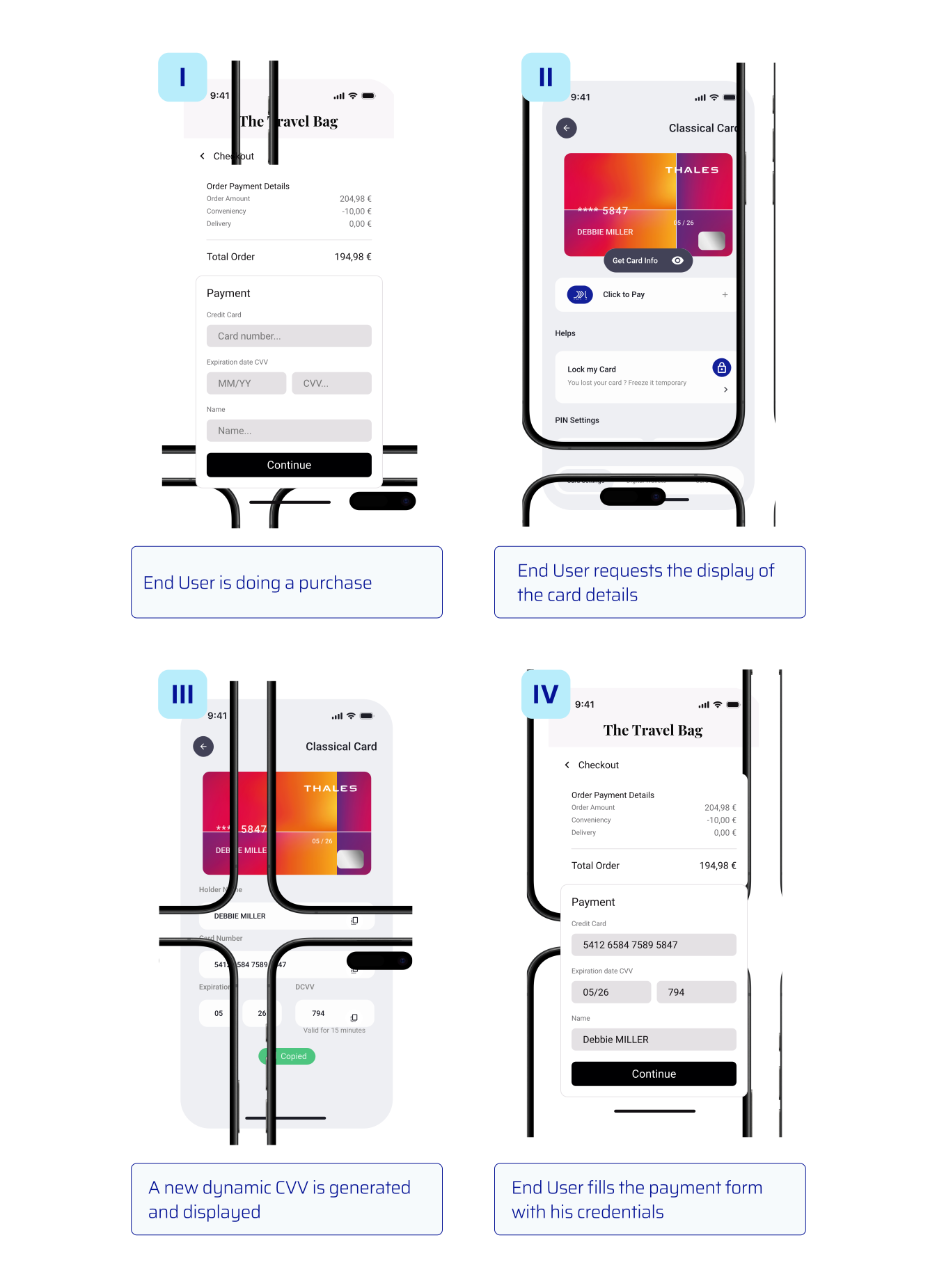
<figure><img src="/files/Yj2IHQnZyrVZo3IQhr99" alt=""><figcaption><p>Example issuer application screen showing a dynamic CVV2.</p></figcaption></figure>

## Flow

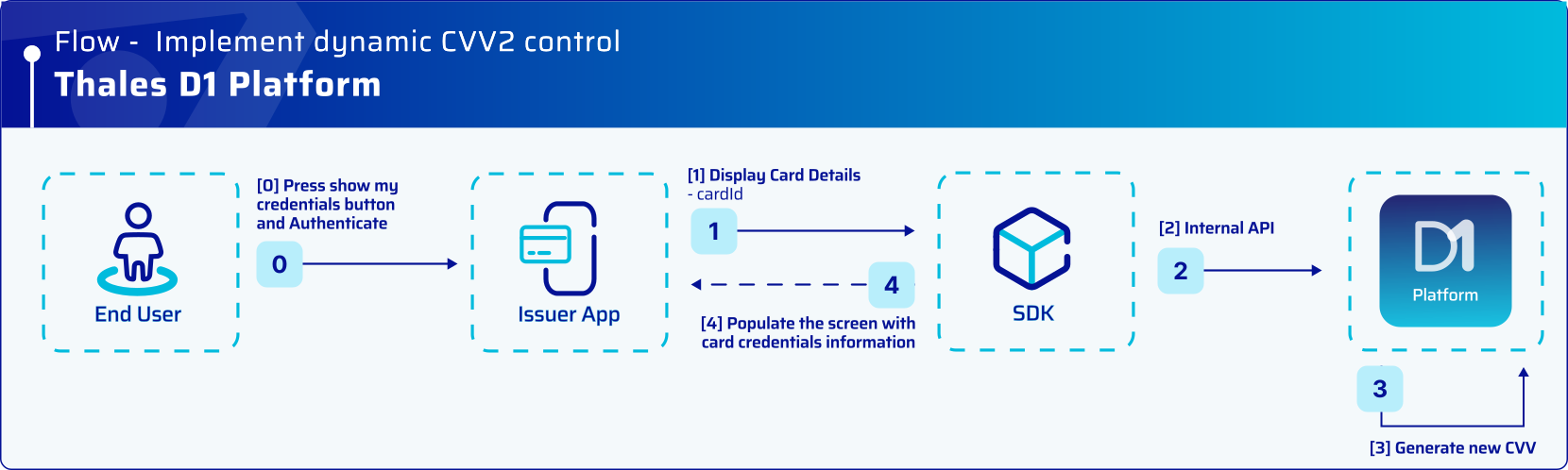
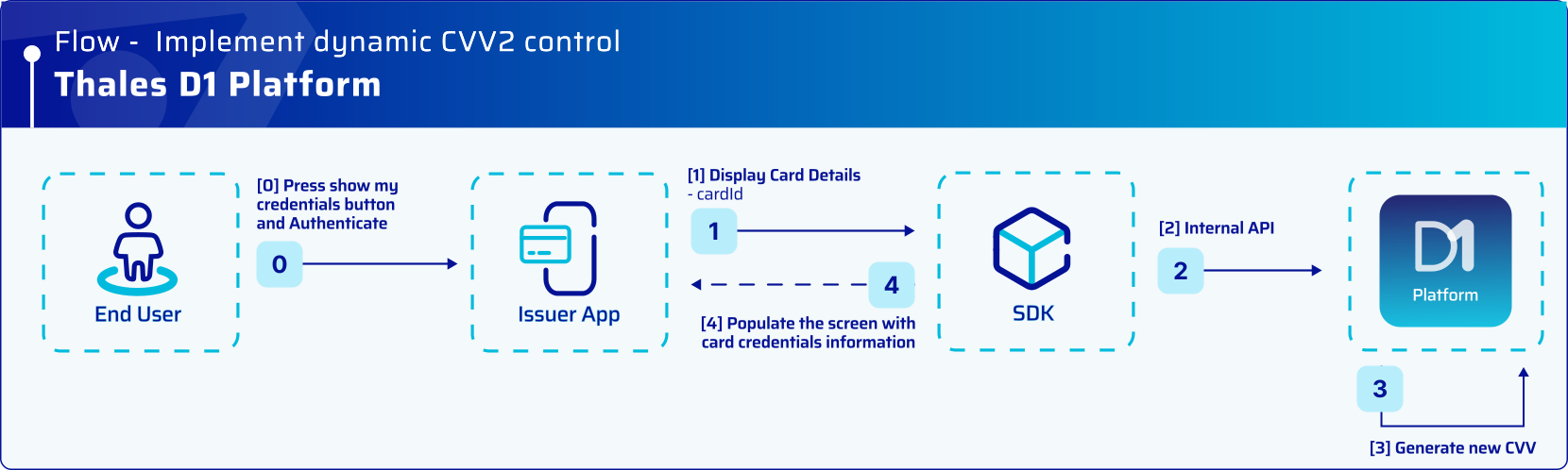
#### Step 1: Generate and display a dynamic CVV2

<figure><img src="/files/d31OhLiJkat1uMdTNusr" alt=""><figcaption><p>Issuer application requests card credentials and displays the dynamic CVV2.</p></figcaption></figure>

#### Step 2: Purchase using the dynamic CVV2

<figure><img src="/files/gC4wrgjpmtCeoJVmRWOy" alt=""><figcaption><p>End User completes the purchase using the displayed dynamic CVV2.</p></figcaption></figure>

## Setup

Configure these parameters per card product during **D1 onboarding**:

* **Dynamic CVV expiry delay**: time window before the active **dynamic CVV2** expires and is deleted.
* **Number of tries**: maximum number of declined authorizations allowed before the active **dynamic CVV2** is deleted. The default is 1.


---

# Agent Instructions
This documentation is published with GitBook. GitBook is the documentation platform designed so that both humans and AI agents can read, navigate, and reason over technical content effectively. Learn more at gitbook.com.

## Querying This Documentation
If you need additional information that is not directly available in this page, you can query the documentation dynamically by asking a question.

Perform an HTTP GET request on the current page URL with the `ask` query parameter:

```
GET https://docs.payments.thalescloud.io/dynamic-cvv/implement-dynamic-cvv2-control.md?ask=<question>
```

The question should be specific, self-contained, and written in natural language.
The response will contain a direct answer to the question and relevant excerpts and sources from the documentation.

Use this mechanism when the answer is not explicitly present in the current page, you need clarification or additional context, or you want to retrieve related documentation sections.