> For the complete documentation index, see [llms.txt](https://docs.payments.thalescloud.io/llms.txt). Markdown versions of documentation pages are available by appending `.md` to page URLs; this page is available as [Markdown](https://docs.payments.thalescloud.io/click-to-pay/ja/implement-click-to-pay-issuers/enroll-cards-in-click-to-pay/enroll-cards-by-d1-api.md).
# D1 APIでカードを登録する
## 概要
このページでは、イシュアバックエンドが D1 API を呼び出すことで、カードとそのエンドユーザーを Click to Pay に登録する方法について説明します [Click to Payに登録](/click-to-pay/ja/integrate-the-d1-api/d1-api-summary.md).
イシュアアプリケーションが API を直接呼び出すことに依存せず、イシュアバックエンドから Click to Pay の登録をオーケストレーションしたい場合は、このバックエンドフローを使用してください。
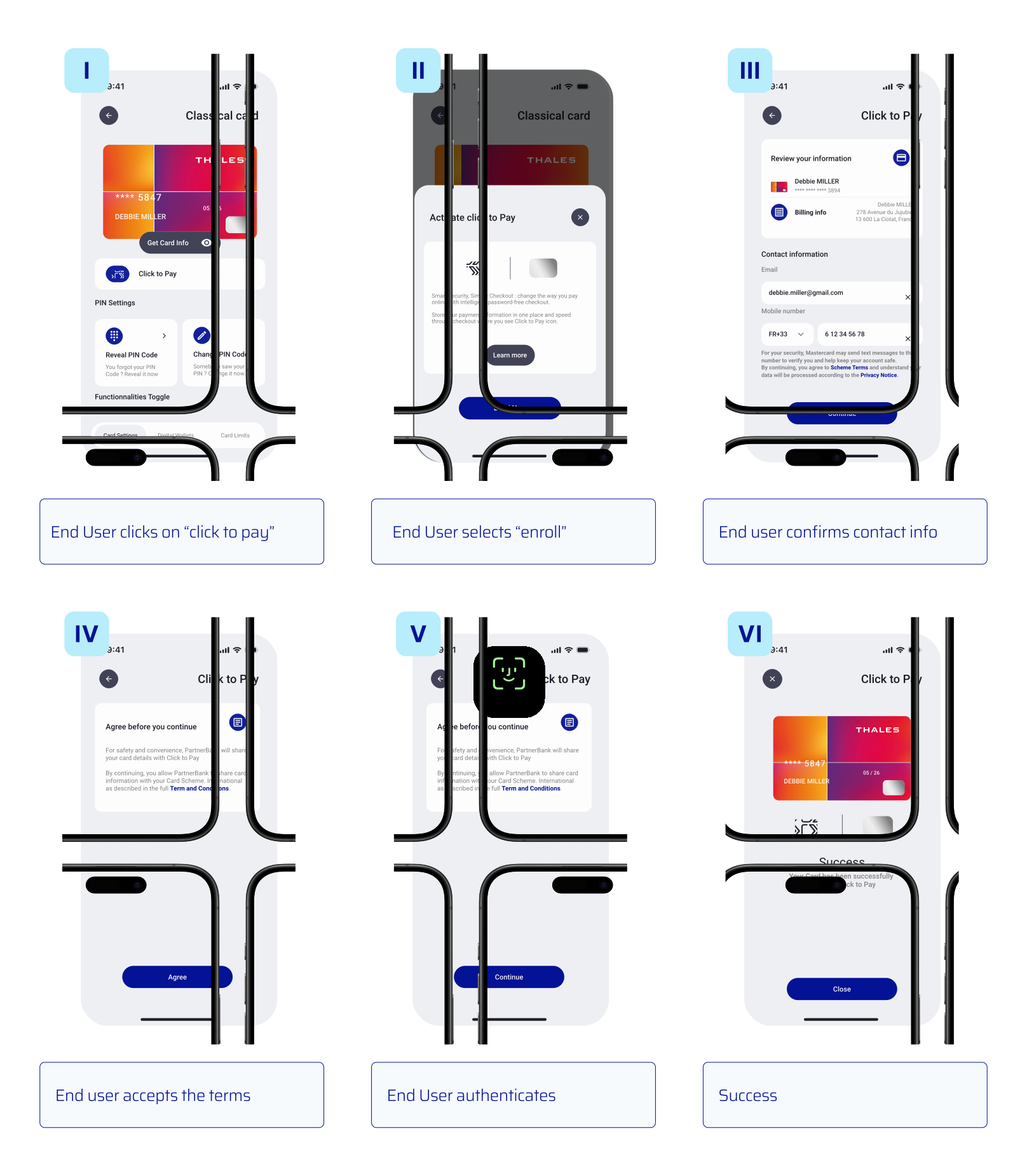
## ユーザー体験
## フロー
次の図は、バックエンドの Click to Pay 登録フローの主な手順を示しています:
## シーケンス図
### 前提条件
については参照してください [前提条件](/click-to-pay/ja/implement-click-to-pay-issuers/enroll-cards-in-click-to-pay.md#prerequisites).
次のシーケンス図は、イシュアバックエンドから開始される Click to Pay 登録フローを示しています:
### 重要なポイント
* イシュアバックエンドは、エンドユーザーの個人情報とカード情報をあらかじめ把握している必要があります。
* 登録は非同期操作です。最終結果は次のいずれかで取得できます:
* 標準の getter 操作を呼び出す、または
* D1 バックエンド通知を有効にする(詳細は [API の概要](/click-to-pay/ja/integrate-the-d1-api/d1-api-summary.md)).
* 決済ネットワークに関連付けられた TSP が、通常のデジタル化フローを開始します。イシュアバックエンドは、通常どおりこのフローを引き続き管理します。変更は不要です。Click to Pay は eコマース取引に適用されるため、通常は承認されることが想定されます。
{% hint style="warning" %}
この API は一括登録をサポートしていません。Click to Pay サービスでカードの大量登録を行う必要がある場合は、 [Click to Pay の自動登録を使用したバッチファイル登録](/click-to-pay/ja/register-cards-via-batch-file.md).
自動登録機能を設定するには、Thales の担当者にお問い合わせください。
{% endhint %}
---
# Agent Instructions
This documentation is published with GitBook. GitBook is the documentation platform designed so that both humans and AI agents can read, navigate, and reason over technical content effectively. Learn more at gitbook.com.
## Querying This Documentation
If you need additional information that is not directly available in this page, you can query the documentation dynamically by asking a question.
Perform an HTTP GET request on the current page URL with the `ask` query parameter, and the optional `goal` query parameter:
```
GET https://docs.payments.thalescloud.io/click-to-pay/ja/implement-click-to-pay-issuers/enroll-cards-in-click-to-pay/enroll-cards-by-d1-api.md?ask=&goal=
```
`ask` is the immediate question: it should be specific, self-contained, and written in natural language.
`goal` is optional and describes the broader end goal you are ultimately trying to accomplish on behalf of the user. GitBook uses it to tailor the answer towards what is most useful for that goal.
The response will contain a direct answer to the question and relevant excerpts and sources from the documentation.
Use this mechanism when the answer is not explicitly present in the current page, you need clarification or additional context, or you want to retrieve related documentation sections.