> For the complete documentation index, see [llms.txt](https://docs.payments.thalescloud.io/llms.txt). Markdown versions of documentation pages are available by appending `.md` to page URLs; this page is available as [Markdown](https://docs.payments.thalescloud.io/click-to-pay/es/implement-click-to-pay-issuers/enroll-cards-in-click-to-pay/enroll-cards-by-d1-api.md).
# Inscribir tarjetas mediante la API de D1
## Descripción general
Esta página explica cómo el backend del emisor puede inscribir una tarjeta y a su usuario final en Click to Pay llamando a la API D1 [Inscripción en Click to Pay](/click-to-pay/es/integrate-the-d1-api/d1-api-summary.md).
Use este flujo de backend cuando quiera orquestar la inscripción en Click to Pay desde el backend del emisor sin depender de que la aplicación del emisor llame directamente a la API.
## Experiencia del usuario
## Flujo
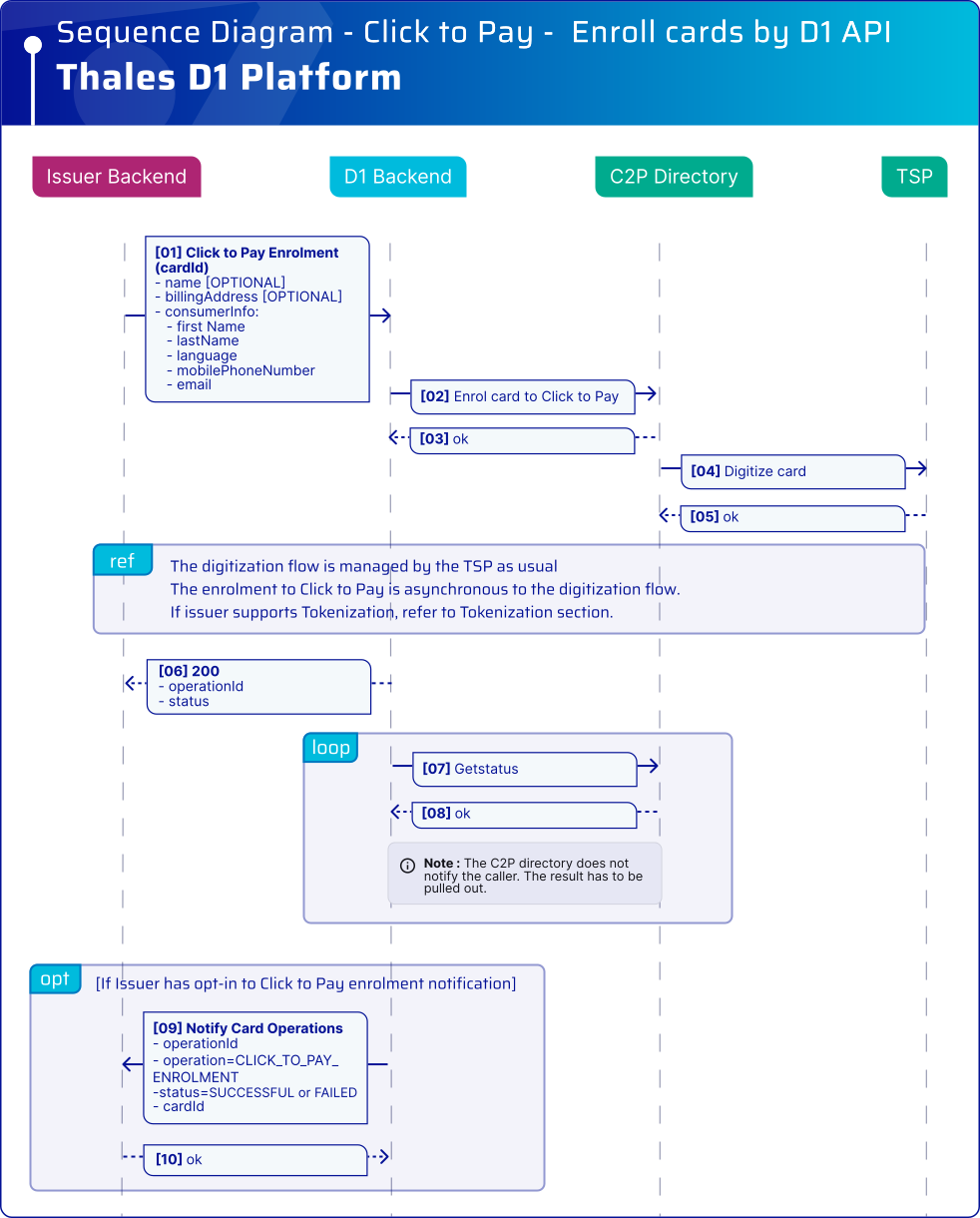
El siguiente diagrama ilustra los pasos principales del flujo de inscripción en Click to Pay desde el backend:
## Diagrama de secuencia
### Requisitos previos
Consulte [los requisitos previos](/click-to-pay/es/implement-click-to-pay-issuers/enroll-cards-in-click-to-pay.md#prerequisites).
El siguiente diagrama de secuencia muestra el flujo de inscripción en Click to Pay iniciado desde el backend del emisor:
### Puntos clave
* El backend del emisor ya debe conocer los datos personales y de la tarjeta del usuario final.
* La inscripción es una operación asíncrona. El resultado final se puede recuperar de cualquiera de las siguientes formas:
* llamando a la operación estándar de obtención, o
* habilitando las notificaciones de backend de D1 (consulte la [Resumen de la API](/click-to-pay/es/integrate-the-d1-api/d1-api-summary.md)).
* El TSP asociado con la red de pago desencadena el flujo de digitalización habitual. El backend del emisor continúa gestionando este flujo como de costumbre; no se requieren cambios. Dado que Click to Pay se aplica a transacciones de comercio electrónico, por lo general se espera la aprobación.
{% hint style="warning" %}
Esta API no admite inscripciones masivas. Si necesita realizar una inscripción masiva de tarjetas en el servicio Click to Pay, use [el registro de archivos por lotes con la inscripción automática en Click to Pay](/click-to-pay/es/register-cards-via-batch-file.md).
Póngase en contacto con su representante de Thales para configurar la función de inscripción automática.
{% endhint %}
---
# Agent Instructions
This documentation is published with GitBook. GitBook is the documentation platform designed so that both humans and AI agents can read, navigate, and reason over technical content effectively. Learn more at gitbook.com.
## Querying This Documentation
If you need additional information that is not directly available in this page, you can query the documentation dynamically by asking a question.
Perform an HTTP GET request on the current page URL with the `ask` query parameter, and the optional `goal` query parameter:
```
GET https://docs.payments.thalescloud.io/click-to-pay/es/implement-click-to-pay-issuers/enroll-cards-in-click-to-pay/enroll-cards-by-d1-api.md?ask=&goal=
```
`ask` is the immediate question: it should be specific, self-contained, and written in natural language.
`goal` is optional and describes the broader end goal you are ultimately trying to accomplish on behalf of the user. GitBook uses it to tailor the answer towards what is most useful for that goal.
The response will contain a direct answer to the question and relevant excerpts and sources from the documentation.
Use this mechanism when the answer is not explicitly present in the current page, you need clarification or additional context, or you want to retrieve related documentation sections.