> For the complete documentation index, see [llms.txt](https://docs.payments.thalescloud.io/llms.txt). Markdown versions of documentation pages are available by appending `.md` to page URLs; this page is available as [Markdown](https://docs.payments.thalescloud.io/classic-push-provisioning/ja/ysuksu/xpayworettohenopusshupurobijoningu/android/googleworettonobaunsupurobijoningu.md).
# Googleウォレットのバウンスプロビジョニング
バウンスプロビジョニングを使用して、エンドユーザーが Google Wallet からカードを検出してプロビジョニングできるようにします。
Google Wallet は Android OS を通じてイシュア アプリケーションを検出します。イシュア アプリケーションはエンドユーザーを認証し、対象カードを表示します。
Google の要件については、 [Google Pay バウンスプロビジョニング](https://developers.google.com/pay/issuers/apis/push-provisioning/android/bounce_provisioning?authuser=0).
### ユーザー エクスペリエンス
バウンスプロビジョニングには 2 つのフェーズがあります:
1. Google Wallet はイシュア アプリケーションを検出して起動します。
2. イシュア アプリケーションはエンドユーザーを認証し、トークナイゼーションを開始します。
#### 検出と認証
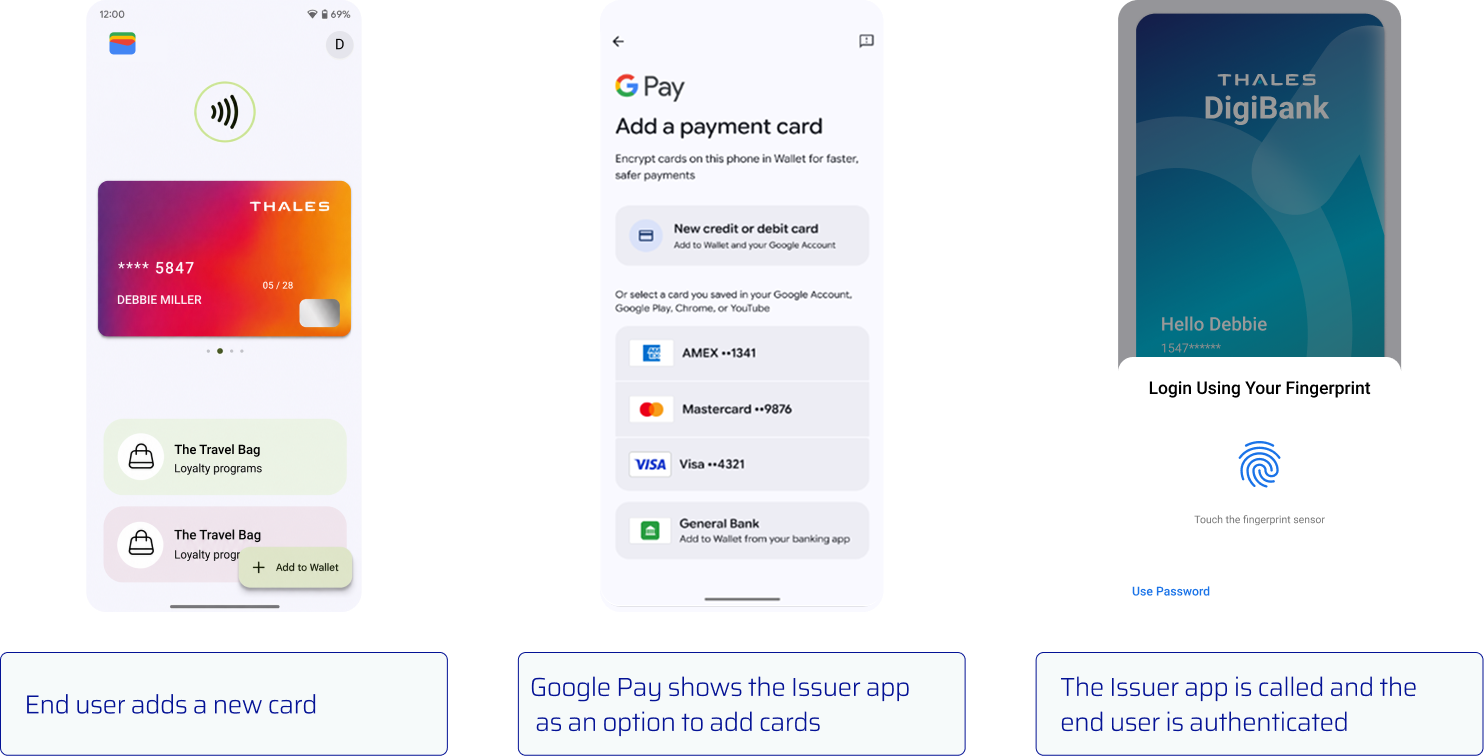
{% stepper %}
{% step %}
**Google Wallet を開く**
エンドユーザーは Google Wallet を開き、支払いカードを追加するオプションを選択します。
{% endstep %}
{% step %}
**イシュア アプリケーションを選択する**
Google Wallet は、Android マニフェストが登録要件を満たしている場合にイシュア アプリケーションを表示します。
{% endstep %}
{% step %}
**エンドユーザーを認証する**
Google Wallet はイシュア アプリケーションを開きます。イシュア アプリケーションはエンドユーザーを認証します。
{% endstep %}
{% endstepper %}
#### カードを選択してプロビジョニングする
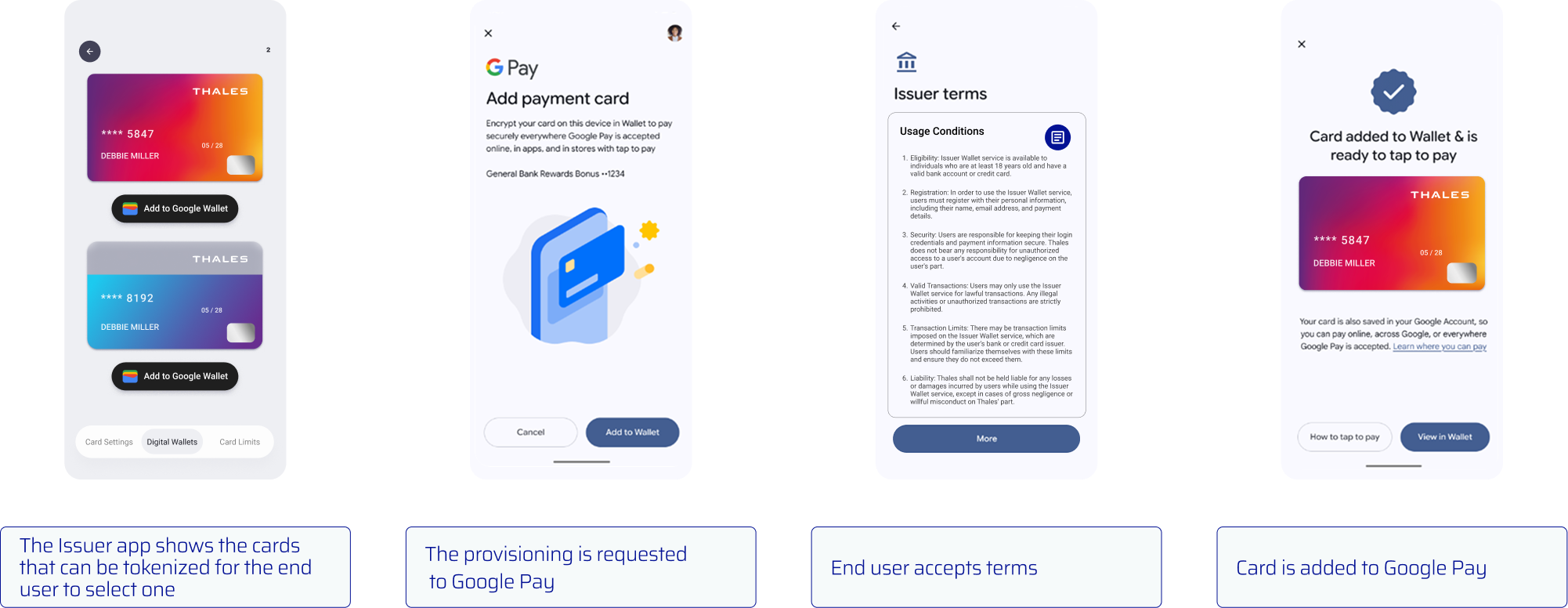
{% stepper %}
{% step %}
**対象カードを表示する**
認証後、 [各カードのデジタル化状態を確認します](/classic-push-provisioning/ja/ysuksu/xpayworettohenopusshupurobijoningu/android/pusshupurobijoningu.md#step-1-showing-the-add-to-wallet-button)。トークナイゼーションの対象となるカードを表示します。
{% endstep %}
{% step %}
**プロビジョニングを開始する**
エンドユーザーがカードを選択したら、次を設定します `cardInfo.setBounceProvisioned(true)`。次に [カードをプロビジョニングします](/classic-push-provisioning/ja/ysuksu/xpayworettohenopusshupurobijoningu/android/pusshupurobijoningu.md#step-2-provisioning-a-request) Google Pay を使用して `addCard` を受け取るオーバーロード `Activity`.
{% endstep %}
{% step %}
**利用規約に同意する**
Google Wallet は適用される利用規約を表示します。エンドユーザーは続行するためにこれに同意します。
{% endstep %}
{% step %}
**カードを Google Wallet に追加する**
Google Wallet はトークナイゼーションを完了し、カードを追加します。
{% endstep %}
{% endstepper %}
### バウンスプロビジョニングを有効にする
#### 登録を完了する
必要なバウンスプロビジョニング登録を完了します [フォーム](https://developers.google.com/pay/issuers/apis/push-provisioning/android/bounce_provisioning) 機能を有効にする前に。
#### Android マニフェストを更新する
バウンスプロビジョニングは、Push Provisioning SDK 2.0.0 以降を搭載した実機の Android スマートフォンで利用できます。
対象カードを表示するアクティビティを作成します。次を追加します **Google Wallet に追加** 各カードのボタン。次に、次を宣言します `ACTION_INITIATE_PROVISIONING` の intent を `AndroidManifest.xml`.
```xml
<インテントフィルター>
```
{% hint style="warning" %}
含める `カテゴリ` 〜の中の要素 `インテントフィルター`。これがないと、Google Wallet はバウンスプロビジョニング用のイシュアアプリケーションを表示しません。
{% endhint %}
#### Android アクティビティを作成します
Google Wallet のバウンスプロビジョニング インテントを処理するアクティビティを作成します。対象のカードを表示し、 **Google Wallet に追加** ボタン。
```java
public class BounceProvisioningActivity extends FragmentActivity {
private PushProvisioning pushProvisioning;
@Override
protected void onCreate(@Nullable Bundle savedInstanceState) {
super.onCreate(savedInstanceState);
Intent intent = getIntent();
if (intent != null
&& "com.google.android.gms.tapandpay.issuer.ACTION_INITIATE_PROVISIONING"
.equals(intent.getAction())) {
// 利用可能なカードと「Google ウォレットに追加」ボタンを表示します。
// 選択したカードに対して、cardInfo.setBounceProvisioned(true) を呼び出します。
// 次に addCard(activity, cardInfo, addCardListenerGPay) を呼び出します。
}
}
@Override
public void onActivityResult(int requestCode, int resultCode, @Nullable Intent data) {
pushProvisioning.handleWalletResult(requestCode, resultCode, data);
}
}
```
---
# Agent Instructions
This documentation is published with GitBook. GitBook is the documentation platform designed so that both humans and AI agents can read, navigate, and reason over technical content effectively. Learn more at gitbook.com.
## Querying This Documentation
If you need additional information that is not directly available in this page, you can query the documentation by asking a question.
Perform an HTTP GET request on the following URL with the `ask` and `goal` query parameters:
```
GET https://docs.payments.thalescloud.io/classic-push-provisioning/ja/ysuksu/xpayworettohenopusshupurobijoningu/android/googleworettonobaunsupurobijoningu.md?ask=&goal=
```
`ask` is the immediate question: it should be specific, self-contained, and written in natural language.
`goal` is what the user is ultimately trying to achieve, the reason they need the answer. Sharing it helps GitBook give you a better, more relevant answer. A goal is most helpful when it describes the outcome the user wants rather than restating the question. For example, with `ask=how do I create an API token`, a goal like `automate deployments from our CI pipeline` lets GitBook tailor the answer to that use case.
The response will contain a direct answer to the question and relevant excerpts and sources from the documentation.
Use this mechanism when the answer is not explicitly present in the current page, you need clarification or additional context, or you want to retrieve related documentation sections.