> For the complete documentation index, see [llms.txt](https://docs.payments.thalescloud.io/llms.txt). Markdown versions of documentation pages are available by appending `.md` to page URLs; this page is available as [Markdown](https://docs.payments.thalescloud.io/classic-push-provisioning/es/casos-de-uso/aprovisionamiento-push-para-carteras-xpay/android/aprovisionamiento-de-rebote-de-google-wallet.md).
# Aprovisionamiento de rebote de Google Wallet
Usa el aprovisionamiento por rebote para permitir que los usuarios finales descubran y aprovisionen tarjetas desde Google Wallet.
Google Wallet descubre la aplicación emisora a través del sistema operativo Android. La aplicación emisora autentica al usuario final y muestra las tarjetas elegibles.
Para conocer los requisitos de Google, consulta [Google Pay Bounce Provisioning](https://developers.google.com/pay/issuers/apis/push-provisioning/android/bounce_provisioning?authuser=0).
### Experiencia de usuario
El aprovisionamiento por rebote tiene dos fases:
1. Google Wallet descubre y inicia la aplicación emisora.
2. La aplicación emisora autentica al usuario final e inicia la tokenización.
#### Descubrimiento y autenticación
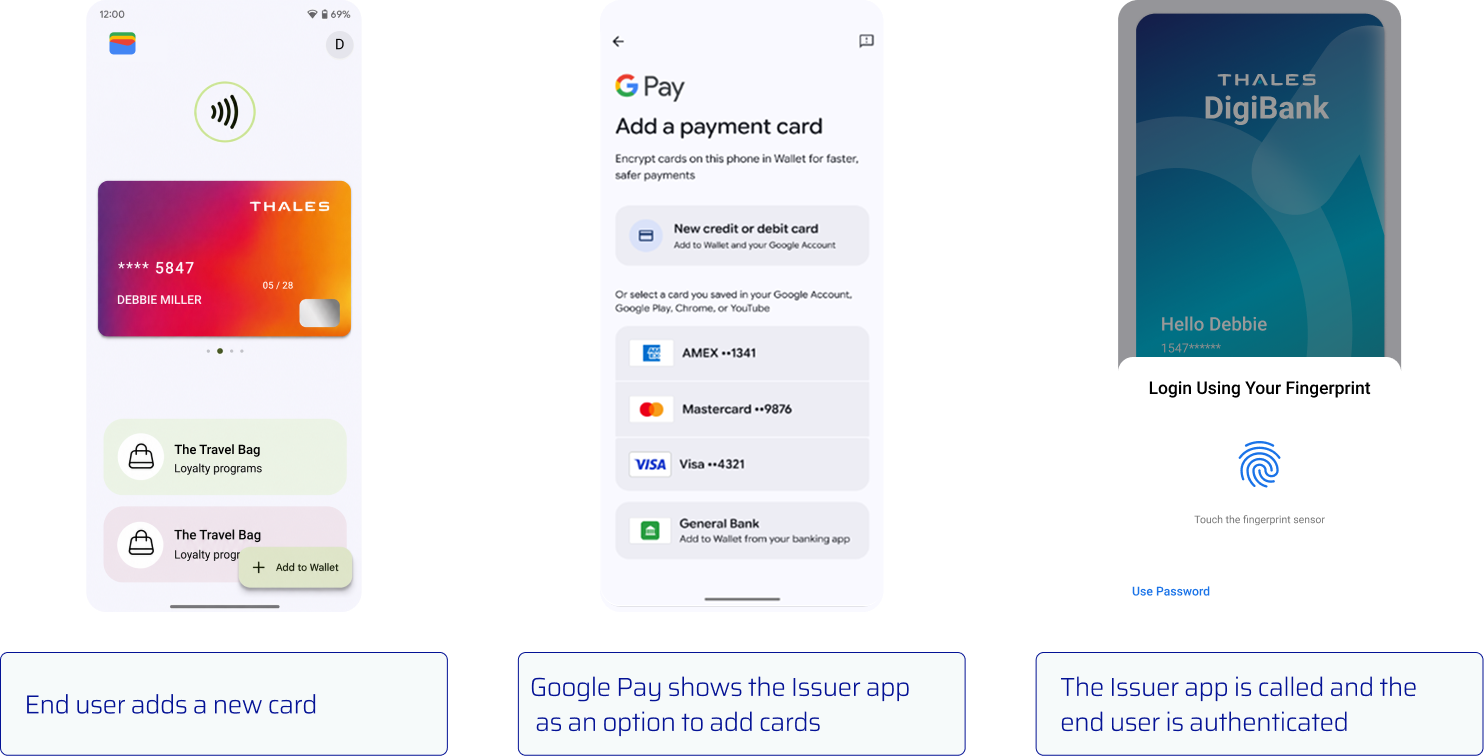
{% stepper %}
{% step %}
**Abre Google Wallet**
El usuario final abre Google Wallet y selecciona la opción para añadir una tarjeta de pago.
{% endstep %}
{% step %}
**Selecciona la aplicación emisora**
Google Wallet muestra la aplicación emisora cuando su manifiesto de Android cumple los requisitos de registro.
{% endstep %}
{% step %}
**Autentica al usuario final**
Google Wallet abre la aplicación emisora. La aplicación emisora autentica al usuario final.
{% endstep %}
{% endstepper %}
#### Selecciona y aprovisiona una tarjeta
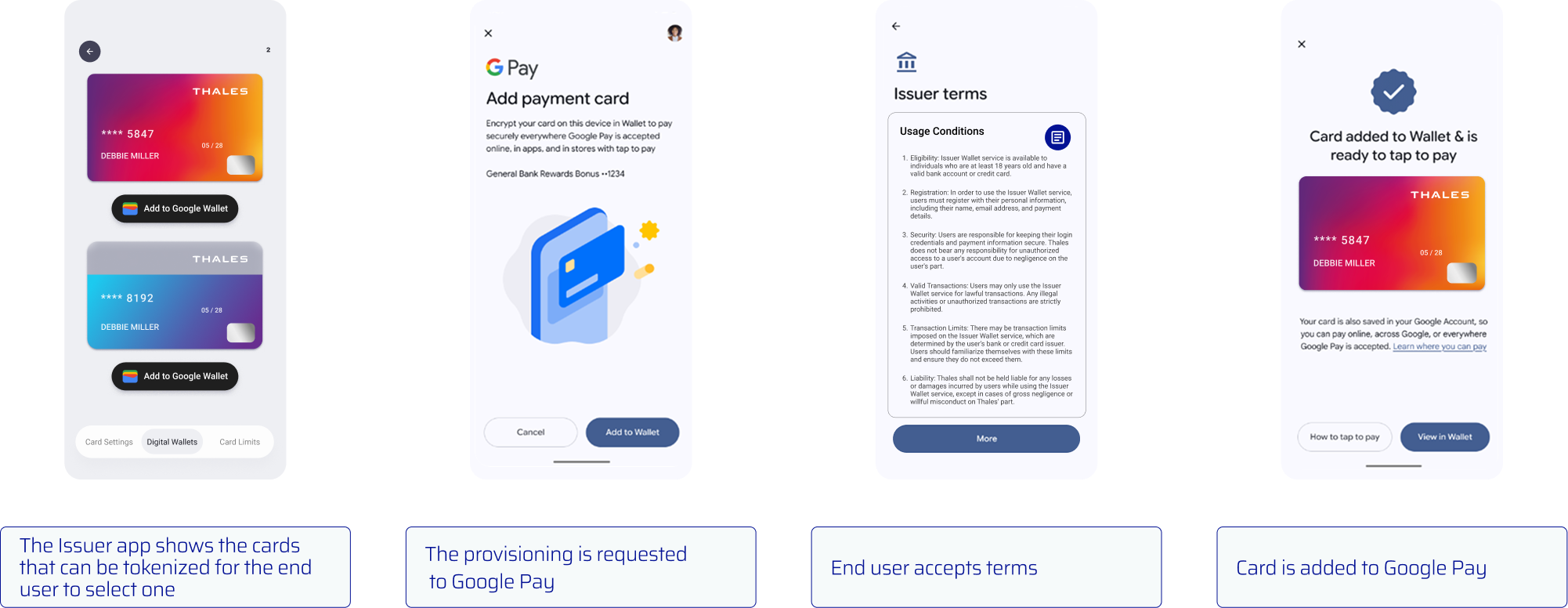
{% stepper %}
{% step %}
**Muestra las tarjetas elegibles**
Después de la autenticación, [comprueba el estado de digitalización de cada tarjeta](/classic-push-provisioning/es/casos-de-uso/aprovisionamiento-push-para-carteras-xpay/android/aprovisionamiento-push.md#step-1-showing-the-add-to-wallet-button). Muestra las tarjetas que son elegibles para la tokenización.
{% endstep %}
{% step %}
**Inicia el aprovisionamiento**
Cuando el usuario final selecciona una tarjeta, establece `cardInfo.setBounceProvisioned(true)`. Luego [aprovisiona la tarjeta](/classic-push-provisioning/es/casos-de-uso/aprovisionamiento-push-para-carteras-xpay/android/aprovisionamiento-push.md#step-2-provisioning-a-request) usando Google Pay `addCard` sobrecarga que acepta un `Activity`.
{% endstep %}
{% step %}
**Acepta los términos y condiciones**
Google Wallet presenta los términos y condiciones aplicables. El usuario final los acepta para continuar.
{% endstep %}
{% step %}
**Añade la tarjeta a Google Wallet**
Google Wallet completa la tokenización y añade la tarjeta.
{% endstep %}
{% endstepper %}
### Habilita el aprovisionamiento por rebote
#### Completa el registro
Completa el formulario [de registro de aprovisionamiento por rebote requerido](https://developers.google.com/pay/issuers/apis/push-provisioning/android/bounce_provisioning) antes de habilitar la función.
#### Actualiza el manifiesto de Android
El aprovisionamiento por rebote está disponible en teléfonos inteligentes Android físicos con Push Provisioning SDK 2.0.0 y versiones posteriores.
Crea una actividad que muestre las tarjetas elegibles. Añade un **Añadir a Google Wallet** botón para cada tarjeta. Luego declara el `ACTION_INITIATE_PROVISIONING` intent en `AndroidManifest.xml`.
```xml
```
{% hint style="warning" %}
Incluye el `elemento category` en el `intent-filter`. Sin él, Google Wallet no muestra la aplicación emisora para el aprovisionamiento por rebote.
{% endhint %}
#### Crea una actividad de Android
Crea una actividad que gestione el intent de aprovisionamiento por rebote de Google Wallet. Muestra las tarjetas elegibles y un **Añadir a Google Wallet** botón.
```java
public class BounceProvisioningActivity extends FragmentActivity {
private PushProvisioning pushProvisioning;
@Override
protected void onCreate(@Nullable Bundle savedInstanceState) {
super.onCreate(savedInstanceState);
Intent intent = getIntent();
if (intent != null
&& "com.google.android.gms.tapandpay.issuer.ACTION_INITIATE_PROVISIONING"
.equals(intent.getAction())) {
// Muestra las tarjetas elegibles y un botón Añadir a Google Wallet.
// Para la tarjeta seleccionada, llama a cardInfo.setBounceProvisioned(true).
// Luego llama a addCard(activity, cardInfo, addCardListenerGPay).
}
}
@Override
public void onActivityResult(int requestCode, int resultCode, @Nullable Intent data) {
pushProvisioning.handleWalletResult(requestCode, resultCode, data);
}
}
```
---
# Agent Instructions
This documentation is published with GitBook. GitBook is the documentation platform designed so that both humans and AI agents can read, navigate, and reason over technical content effectively. Learn more at gitbook.com.
## Querying This Documentation
If you need additional information that is not directly available in this page, you can query the documentation by asking a question.
Perform an HTTP GET request on the following URL with the `ask` and `goal` query parameters:
```
GET https://docs.payments.thalescloud.io/classic-push-provisioning/es/casos-de-uso/aprovisionamiento-push-para-carteras-xpay/android/aprovisionamiento-de-rebote-de-google-wallet.md?ask=&goal=
```
`ask` is the immediate question: it should be specific, self-contained, and written in natural language.
`goal` is what the user is ultimately trying to achieve, the reason they need the answer. Sharing it helps GitBook give you a better, more relevant answer. A goal is most helpful when it describes the outcome the user wants rather than restating the question. For example, with `ask=how do I create an API token`, a goal like `automate deployments from our CI pipeline` lets GitBook tailor the answer to that use case.
The response will contain a direct answer to the question and relevant excerpts and sources from the documentation.
Use this mechanism when the answer is not explicitly present in the current page, you need clarification or additional context, or you want to retrieve related documentation sections.