> For the complete documentation index, see [llms.txt](https://docs.payments.thalescloud.io/llms.txt). Markdown versions of documentation pages are available by appending `.md` to page URLs; this page is available as [Markdown](https://docs.payments.thalescloud.io/central-issuance/ja/wosuru/puruchenji.md).
# プル&チェンジ
API 経由で D1 が受信したものの、まだ出荷されていない物理カード注文の更新をリクエストするには、pull and change を使用します。
{% hint style="warning" %}
この機能は、API で注文されたカードでのみ利用できます。
{% endhint %}
### フロー
物理カード注文の pull and change フロー。
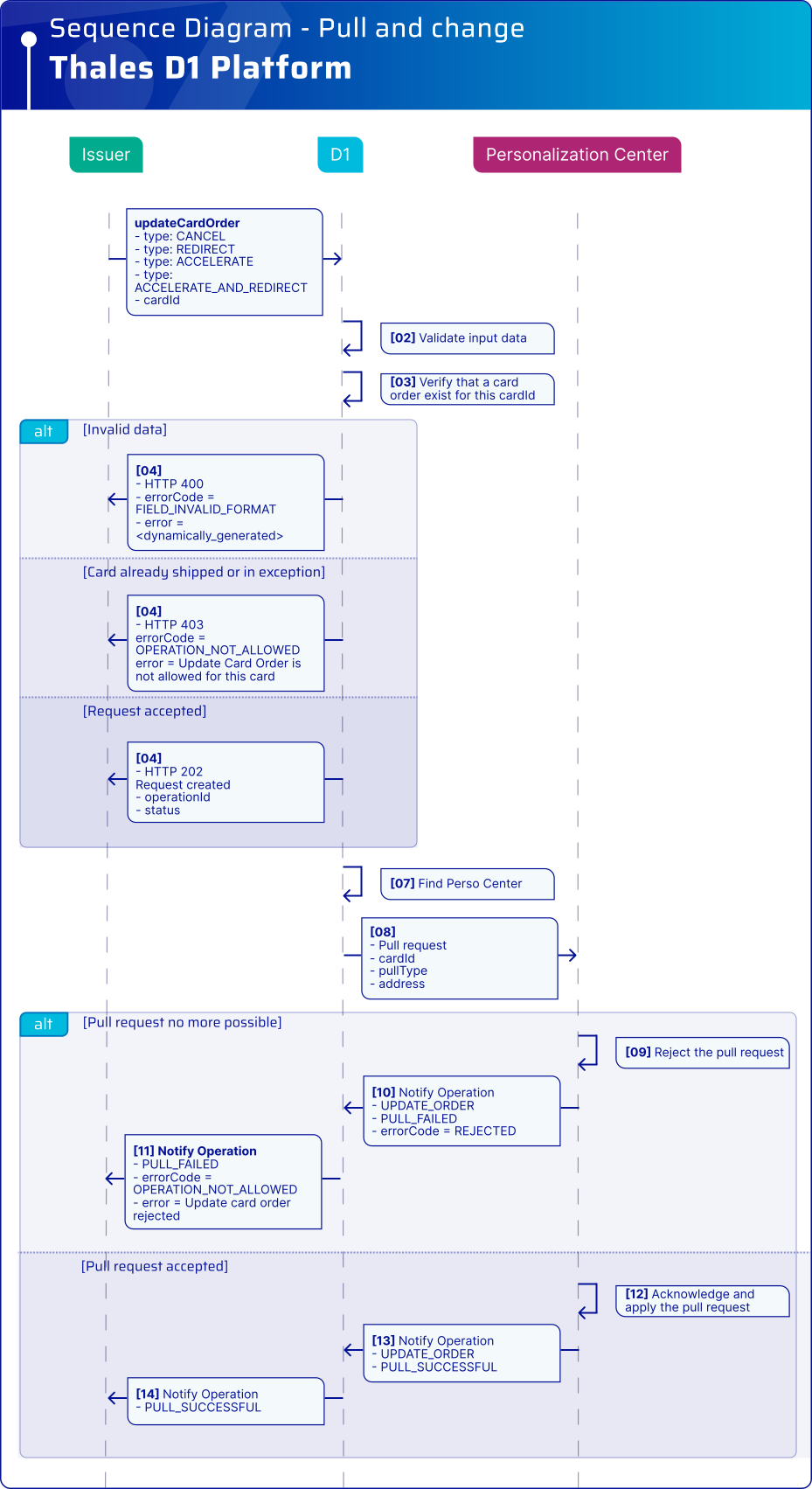
### シーケンス図
### 仕組み
1. イシュアのバックエンドが pull and change リクエストを送信します。一般的な変更タイプ:
* `CANCEL`:カード注文をキャンセルし、カードを破棄します。
* `ACCELERATE`:カードをできるだけ早く作成し、速達配送業者で発送します。
* `REDIRECT`:発送先住所を変更します。
* `ACCELERATE_AND_REDIRECT`:生産を前倒しし、発送先住所を変更します。
2. D1 はリクエストをカードを製造するパーソナライズセンターに転送します。
3. パーソナライズセンターは、生産段階に基づいてリクエストを承認または拒否します。
4. D1 は結果を通知経由で非同期に返します。
### 必要な API
| API | 受信/送信 | 説明 |
| -------------------------------------------------------------------------------------------------------------------------------------------------------------------------------------------------- | ----------------- | ------------------------- |
| [Pull & Change](https://docs.payments.thalescloud.io/central-issuance/ja/d1-api-wosuru/d1-api-rifarensu/apid1-heno/kdo-api-1.md#post-issuers-issuerid-physicalcards-cardid-operations-updateorder) | イシュア -> Thales D1 | カードを取り出し、変更の適用をリクエストします |
| [通知](https://docs.payments.thalescloud.io/central-issuance/ja/d1-api-wosuru/d1-api-rifarensu/apid1-karano/kdo-api.md#post-notifications-d1-v2-issuers-issuerid-cards) | イシュア <- Thales D1 | UPDATE\_ORDER 操作の通知を受信します |
### API 入力
必要な D1 API 入力:
* `issuerId`:イシュアの一意識別子
* `cardId`:カードの一意識別子。
* `type`:カード注文に適用する変更の種類。
条件付きの D1 API 入力、次の場合 `type` is `REDIRECT`or `ACCELERATE_AND_REDIRECT`.
* `newDeliveryAddress` フィールド:
* `title`:敬称(例: `Mr`).
* `firstName`:名。
* `lastName`:姓。
* `companyName`:会社名。
* `line1`:住所1行目。
* `line2`:住所2行目。
* `line3`:住所3行目。
* `city`:市区町村。
* `state`:州または地域。
* `zipCode`:郵便番号。
* `countryCode`:国コード(ISO 3166-1 alpha-2、例: `US`).
* `mobilePhoneNumber`:発送連絡に使用する国際電話番号。
### 例
**例 - CANCEL**
```json
{
"type": "CANCEL"
}
```
**例 - ACCELERATE**
```json
{
"type": "ACCELERATE",
"newDueDate": "2025-01-15"
}
```
**例 - REDIRECT**
```json
{
"type": "REDIRECT",
"newDeliveryAddress": {
"title": "Ms",
"firstName": "Alex",
"lastName": "Chen",
"companyName": "Example Co",
"line1": "10 Main St",
"line2": "Apt 3B",
"city": "New York",
"state": "NY",
"zipCode": "10001",
"countryCode": "US",
"mobilePhoneNumber": "+12125550123"
}
}
```
**例 - ACCELERATE\_AND\_REDIRECT**
```json
{
"type": "ACCELERATE_AND_REDIRECT",
"newDueDate": "2025-01-15",
"newDeliveryAddress": {
"title": "Ms",
"firstName": "Alex",
"lastName": "Chen",
"companyName": "Example Co",
"line1": "10 Main St",
"line2": "Apt 3B",
"city": "New York",
"state": "NY",
"zipCode": "10001",
"countryCode": "US",
"mobilePhoneNumber": "+12125550123"
}
}
```
### 結果を追跡する
* 通知を処理して、承認または拒否の結果を取得します。
---
# Agent Instructions
This documentation is published with GitBook. GitBook is the documentation platform designed so that both humans and AI agents can read, navigate, and reason over technical content effectively. Learn more at gitbook.com.
## Querying This Documentation
If you need additional information that is not directly available in this page, you can query the documentation by asking a question.
Perform an HTTP GET request on the following URL with the `ask` and `goal` query parameters:
```
GET https://docs.payments.thalescloud.io/central-issuance/ja/wosuru/puruchenji.md?ask=&goal=
```
`ask` is the immediate question: it should be specific, self-contained, and written in natural language.
`goal` is what the user is ultimately trying to achieve, the reason they need the answer. Sharing it helps GitBook give you a better, more relevant answer. A goal is most helpful when it describes the outcome the user wants rather than restating the question. For example, with `ask=how do I create an API token`, a goal like `automate deployments from our CI pipeline` lets GitBook tailor the answer to that use case.
The response will contain a direct answer to the question and relevant excerpts and sources from the documentation.
Use this mechanism when the answer is not explicitly present in the current page, you need clarification or additional context, or you want to retrieve related documentation sections.